Header tab
The Header tab is the first tab of the receipt screen.
It holds the identity of the receipt and the main reference data.
The form is receipt_header_form. The data table is receipt.
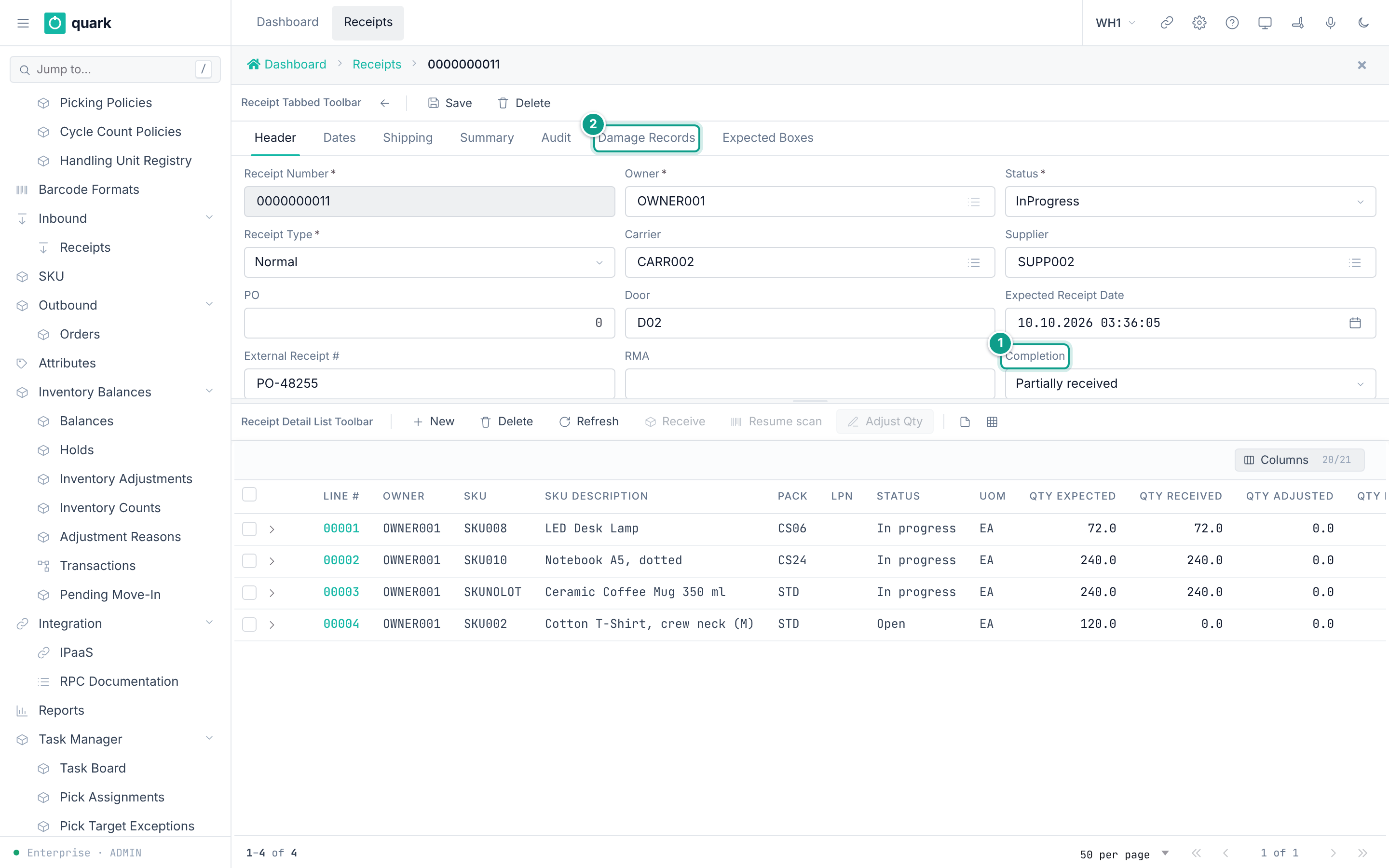
Fields
The fields are laid out in three columns.
| Label | Column | Type | Required | Allowed values and default | What it does |
|---|---|---|---|---|---|
Receipt Number | receipt_number | Text, up to 10 characters. Unique in the warehouse. | Yes | Any text up to 10 characters. A new receipt gets the next number of the counter receipt_number, 10 digits, for example 0000000012. | The key of the document. Read only after the first save. |
Owner | owner_id | Pick list of owners | Yes | An owner of type Own. A new receipt gets the default owner of the warehouse when one is set. | The owner of the goods. Read only after the first save. |
Status | status | Drop-down | Yes | Open, InProgress, OnHold, Closed, Cancelled. A new receipt is Open. Always read only. | Where the receipt is in its life. |
Receipt Type | receipt_type | Drop-down | Yes | Normal (default), CustomerReturn, InterFacilityTransfer, Sscc, CaseLevel. | The kind of receipt. |
Carrier | carrier_id | Pick list of owners | No | An owner of type Carrier. | The company that delivers. |
Supplier | supplier_id | Pick list of owners | No | An owner of type Supplier. | The company that sends the goods. |
PO | po_id | Whole number | No | Any whole number. Empty by default. | A purchase order id. |
Door | door | Text, up to 10 characters | No | Any text. | The dock door. |
Expected Receipt Date | expected_receipt_date | Date and time | No | Empty by default. | The planned arrival. |
External Receipt # | external_receipt_number | Text, up to 50 characters | No | Empty by default. | The number of the document in the other system (ERP). |
RMA | rma | Text, up to 30 characters | No | Empty by default. | The return authorisation number. |
Completion | completion | Drop-down | No | Nothing received, Partially received, Fully received, Over receipt. Always read only. A new receipt is Nothing received (Pending). | How much of the plan has arrived. The system sets it. |
The labels of Completion come from the code list receipt_completion.
The labels of Status and Receipt Type are the names of the database values.
Source of the layout: forms receipt_header_form and receipt_tabbed in crates/libs/wms-lib-sql/sql/wms-meta-ui/migrations/001_baseline.sql.
What each field affects
Receipt Number
- Read only after the first save:
crates/services/web-ui-server/src/extensions/customization/receipt/header_render_action.rs:42. - Used to find the receipt. The ASN search of the RF terminal matches it (
crates/libs/wms-inbound/src/queries/receipt/asn.rs:58). - The number is made by the counter service
get_next_key(crates/services/app-server/src/web/rpcs/key_rpc.rs:35), 10 digits by default. A number you type yourself must not be longer than 10 characters.
Owner
- Only an owner of type Own is accepted when a receipt is created (
crates/libs/wms-lib-core/src/model/receipt/receipt.rs:627). The pick list shows only such owners (formowner_own_list_form). - The owner decides which SKUs the lines can use, and which owner settings and receipt policy are applied when goods are received.
- Every new line takes the owner of the receipt.
Status and Completion
- Both are read only on the screen (
header_render_action.rs:30-31). - They change only through the commands: receiving, hold, release, close, cancel. See Receipt statuses and transitions.
Completiondecides ifCancel Receiptis available (onlyPending) and whether closing needs a supervisor.
Receipt Type
- A new receipt can have any type.
- After the first save the field is read only, with one exception: in status
Opena receipt of typeSsccorCaseLevelcan change its type. A receipt of typeInterFacilityTransferis never editable (header_render_action.rs:67-83). - Types
SsccandCaseLevelmake the quantity,To LocandHold Codeof the lines read only (detail_render_action.rs:93-98). - Type
CustomerReturnis required by the RF return flow (crates/libs/wms-inbound/src/service/receipt/receive/receive_return_line.rs:173). The web screens have no return flow. - For the other types the value is a label.
Not confirmed by code: what the web screens do for a receipt of type
SsccorCaseLevelwhen no planned boxes exist. To verify: create a receipt with typeCaseLevel, add a line, and open the tabExpected Boxes.
Carrier
Stored only. It has no effect today.
The value is shown in the list through a display lookup (crates/services/web-ui-server/src/services/column_display_resolver.rs) and nothing else reads it.
The receipt is refused when the id is not an owner of type Carrier (receipt.rs:656).
Supplier
- The pick list offers owners of type Supplier. A wrong type is refused (
receipt.rs:699). - Read by the daily serial vendor-surge scan, which compares serials per supplier and SKU (
crates/services/app-server/src/services/cleanup_tasks.rs:1210, functionscan_vendor_surge_for_warehouse). It only logs a warning. - Sent in the receipt events (
crates/libs/wms-lib-core/src/model/integration/event_payloads/receipt.rs:73).
PO
- No check is made that the number exists. The check in
ReceiptBmc::createis a placeholder (receipt.rs:640). - Sent in the receipt events (
event_payloads/receipt.rs:72). - A receipt with no
POand noExternal Receipt #counts as a blind receipt in the list methodlist_open_blind_receipts(crates/services/app-server/src/web/rpcs/receipt_rpc/lists.rs:302).
Door
Stored only. It has no effect today.
Expected Receipt Date
- Sorts the ASN search and the list of open receipts, newest first (
asn.rs:60,lists.rs:33). - Shown on the RF receipt summary.
External Receipt
- The ASN search finds receipts by this number too (
asn.rs:58). - Sent in the receipt events (
event_payloads/receipt.rs:104).
RMA
- The method
find_receipt_by_rmasearches this column (lists.rs:340-380).
Messages
| When | Message | What to do |
|---|---|---|
Receipt Number is empty on Save | Receipt number is required | Type a number. |
Owner is empty on Save | Owner id is required | Pick an owner. |
| The number already exists | Duplicate entry on receipt (constraint ...) | Use another number. The constraint is receipt_receipt_number_key. |
| The owner, carrier or supplier is of the wrong type | owners {id} not found | Pick an owner of the right type. |
| A text is longer than the limit | The database refuses it. | Shorten the text. |
The first two messages are made by the Save button (crates/services/web-ui-server/src/extensions/generic/validate_action.rs:228-235).
The others come from the server (crates/libs/wms-lib-core/src/model/error.rs:215,247).
Not confirmed by code: the exact text the screen shows for a text that is too long, and whether the screen adds a prefix to the server messages. To verify: type 11 characters into
Receipt Numberon a new receipt and pressSave; then save a second receipt with the same number.
Saving
Saveon a new receipt callscreate_receipt.Saveon a saved receipt callsupdate_receiptwith the fields you changed. It has no version check.update_receiptis refused when the receipt isClosedorCancelled. The message isreceipt {id} is {status} - cannot edit receipt reference in its current lifecycle state(crates/libs/wms-inbound/src/service/receipt/planning/contracts.rs:60-63). A hold does not stop it.- The call does not accept the fields
owner_id,receipt_number,status,completion,close_date,effective_dateand the two summaries (crates/services/app-server/src/web/rpcs/receipt_rpc/header_commands.rs:68-99).
Related pages
- Creating a receipt
- Editing a receipt
- Dates tab, Shipping tab, Summary tab
- Receipt statuses and transitions
- API:
create_receipt,update_receipt,get_receipt - RF terminal:
Receive Against ASN, screenRCASN01(enter the ASN number).