Line detail tab
The line card opens when you click a line of the lines list or press New there.
The card is a tabbed form (receipt_detail_edit_form, "Receipt Line"). Its first tab is Detail.
The form of the tab is receipt_detail_fields_form. The data table is receipt_detail.
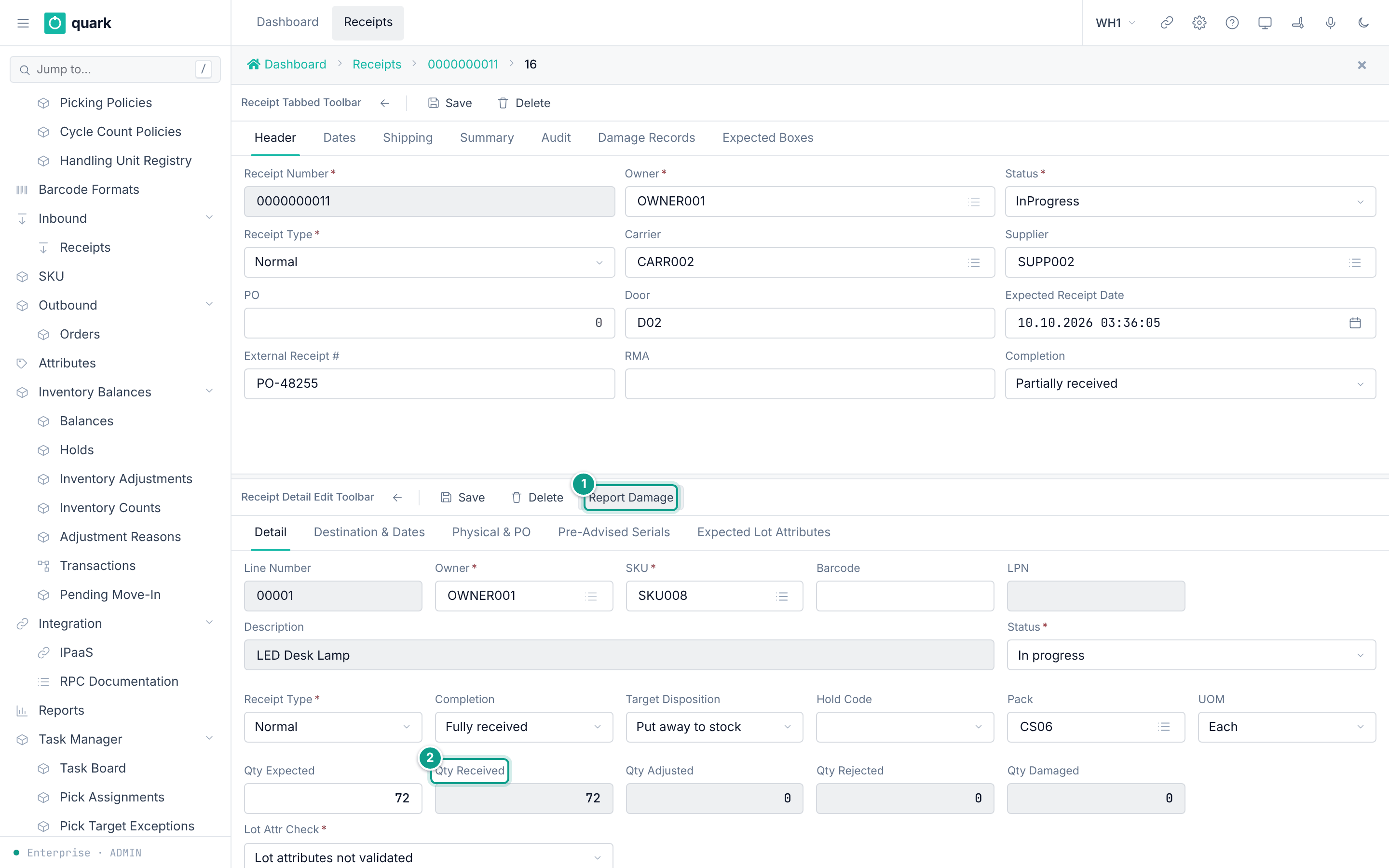
Card toolbar (receipt_detail_edit_toolbar)
| Button | What it does |
|---|---|
| Back arrow | Returns to the lines list. |
Save | Fills the pack and unit from the SKU when empty, checks the required fields, then saves the line and returns to the list. |
Delete | Deletes this line and returns to the list. |
Report Damage | Opens the window Report Damage. See Reporting damage. |
Card tabs
| Tab | Page |
|---|---|
Detail | This page. |
Destination & Dates | Line destination and dates tab |
Physical & PO | Line physical and PO tab |
Serials | Line serials tab. Shown only for SKUs with continuous serial tracking. |
Pre-Advised Serials | Pre-advised serials tab |
Expected Lot Attributes | Expected lot attributes tab |
Fields
| Label | Column | Type | Required | Allowed values and default | What it does |
|---|---|---|---|---|---|
Line Number | receipt_line_number | Text, up to 5 characters | Yes | Made by the system for a new line: 00001, 00002, and so on, counted for each receipt. Read only. Unique in the receipt. | Identifies the line. |
Owner | owner_id | Pick list | Yes | Copied from the receipt. Read only. | The owner of the goods. |
SKU | sku | Pick list of SKUs | Yes | A SKU of the owner. | The item. |
Barcode | barcode | Text, up to 50 characters | No | Empty. | Stored only. It has no effect today. |
LPN | lpn | Text | No | Shown for information. Read only. | The pallet the supplier announced for this line. |
Description | (none) | Text | No | Read only. Filled from the SKU. | Shows the SKU description. Not saved. |
Status | status | Drop-down | Yes | Open, In progress, On hold, Closed, Cancelled. Read only. | The status of the line. |
Receipt Type | receipt_type | Drop-down | Yes | Copied from the receipt. Read only. | |
Completion | completion | Drop-down | No | Nothing received, Partially received, Fully received, Over receipt. Read only. | How much of this line has arrived. |
Target Disposition | target_disposition | Drop-down | No | Put away to stock (Stock, default), Cross-dock, Hold for inspection. Read only. | Stored only. It has no effect today. |
Hold Code | hold_code | Drop-down | No | A hold code. Read only. Up to 20 characters. | Stored only. It has no effect today. |
Pack | pack_id | Pick list of packs | Yes (see below) | The pack of the SKU is filled in when empty. | The pack used to convert units when you receive. |
UOM | uom | Drop-down of units | Yes (see below) | The base unit of the pack is filled in when empty. | The unit of Qty Expected. |
Qty Expected | qty_expected | Number | See below | Database default 0. | The planned quantity. |
Qty Received | qty_received | Number | No | 0. Read only. | The received quantity. |
Qty Adjusted | qty_adjusted | Number | No | 0. Read only. | Stored only. It has no effect today. |
Qty Rejected | qty_rejected | Number | No | 0. Read only. | Counts as arrived goods in Completion. |
Qty Damaged | qty_damaged | Number | No | 0. Read only. | Counts as arrived goods in Completion. |
Lot Attr Check | lot_attr_check_mode | Drop-down | Yes | Lot attributes not validated (Disabled, default), Validate; supervisor override allowed (Advisory), ASN-pre-bound; hard reject on mismatch (Strict). Read only. | How the lot attributes you scan are checked against the expected ones. |
The labels of Status, Completion, Target Disposition and Lot Attr Check come from code lists (receipt_status, receipt_completion, target_disposition, LOTATTRMODE).
The code list LOTATTRMODE and the lists of receipt type and hold codes are created by the development seed (crates/libs/wms-lib-sql/sql/dev_only/install-db/900-dev-seed.sql). A production tenant may use other words.
Source of the layout: form receipt_detail_fields_form in 001_baseline.sql (wms-meta-ui).
What each field affects
SKU
- The SKU must exist for the owner of the receipt. Otherwise the line is refused with
SKU {code} not found for owner {id}(crates/libs/wms-lib-core/src/model/receipt/receipt_detail.rs:1117-1123). - The SKU gives the pack, the unit, the lot policy and the serial settings used at receiving. It also gives the receipt policy (
Policy > Receipt Policy) that judges quantity, pack multiples, dates and pallets. - After you pick a SKU the tab is redrawn and the description is read from the SKU master (
receipt_detail_enrich,crates/services/web-ui-server/src/extensions/customization/receipt/detail_enrich_action.rs).
Barcode
Stored only. It has no effect today.
The database comment says the column is for audit: it keeps the raw scan when a SKU was found by a barcode (crates/libs/wms-lib-sql/sql/wms-app/migrations/001_baseline.sql, comment on receipt_detail.barcode).
LPN
- A line gets an expected LPN only through the API method
create_receipt_detail(parameterexpected_lpn) or a case-level ASN. There is no field to type it on this card. - The receive window offers this pallet as the target (
crates/libs/wms-inbound/src/service/receipt/expected_lpn.rs). A scan of this LPN finds the line.
Status
- Set by the system. A line becomes
In progresswhen goods are received. Hold, close and cancel of the receipt change every line that is not closed or cancelled. See Receipt statuses and transitions. - The line gate of the buttons reads the status of the receipt, not of the line, for adding, editing and deleting (
crates/libs/wms-inbound/src/service/receipt/planning/contracts.rs:327-342).
Completion
- Computed from the quantities: received + rejected + damaged against expected.
Pendingwhen nothing arrived,Partialwhen less,Fullwhen equal,Overwhen more (crates/libs/wms-inbound/src/repo/completion_compute.rs:39-49). - A receipt can be cancelled only while every line is
Pending(aggregate.rs:139).
Target Disposition and Hold Code
Stored only. They have no effect today.
Receiving fills them from the status of the location: a location with status Damage gives Hold and the hold code Damaged (crates/libs/wms-inbound/src/service/receipt/receive/receive_against_asn.rs:748-753,783). No other code reads them.
Pack and UOM
Savefills an emptyPackwith the pack of the SKU, and an emptyUOMwith the base unit of that pack (the unit of the pack row that has no child), or the default unit of the SKU (crates/services/web-ui-server/src/extensions/customization/receipt/pre_save_action.rs). Because of this, a normal SKU never fails on an emptyPack.- A
UOMthat is not in the unit list is refused withCode {code} not found(crates/libs/wms-lib-core/src/model/policies/uom_class.rs:70-76). - The receive window counts in the units of the pack of the SKU. It converts them to the base unit.
Qty Expected
- Saving a line with
Qty ExpectedandQty Receivedboth empty or 0 is refused (see messages). - The expected quantity of all lines of one SKU is added up. The receiving checks (excess, shortage, completion) work on this sum (
crates/libs/wms-inbound/src/service/receipt/validation/validation_qty.rs). - The field is read only for receipts of type
SsccandCaseLevel(detail_render_action.rs:93-98).
Qty Received, Qty Rejected, Qty Damaged
- Read only.
Qty Receivedgrows withReceiveand changes withAdjust Qty. Qty Damagedgrows only when the owner action for the severity isReject(report_damage.rs, functionhandle_damage_action).Qty Rejectedis written only by the RF return flow. In the web screens it stays 0.
Qty Adjusted
Stored only. It has no effect today.
It is never written after the line is created. Adjust Qty changes Qty Received, not Qty Adjusted (a search for writers of qty_adjusted found only the default and the event name).
Lot Attr Check
- The web screens cannot change it. A line made on the web has
Disabled. Other values come only from the API. Strict: the lot attributes you scan must equal the expected ones, or receiving is refused (code 34).Advisory: a difference is refused with code 36, which a supervisor can allow when the attribute allows overrides. Sources:crates/libs/wms-inbound/src/service/receipt/validation/validation_external_lot.rs:100-165andvalidation_lot_attrs.rs.
Rules for editing
- These fields are read only at all times:
Line Number,Owner,Status,Receipt Type,Description. - After goods are received,
POandPO Detailon the tab Physical & PO are read only. Saveof an existing line sends only the fields you changed. The server accepts only these fields for a line:sku,barcode,qty_expected,uom,pack_id,to_loc,to_lot, the four dates,temperature,po_id,po_detail_id,reason_code,return_type,return_reason,rma,external_receipt_number,external_receipt_line_number,external_lot(crates/services/app-server/src/web/rpcs/receipt_detail_rpc.rs:121-153).- A line of a
ClosedorCancelledreceipt cannot be saved. A line of a receipt on hold can be saved.
Messages
| When | Message |
|---|---|
Owner is empty on Save | Owner id is required |
SKU is empty on Save | Sku is required |
Pack is still empty after the fill-in | Pack id is required |
UOM is still empty after the fill-in | Uom is required |
Qty Expected and Qty Received are both empty or 0 | Specify either qty_expected (ASN promise) or qty_received (physical receive) — both cannot be empty. |
| The SKU is not a SKU of the owner | SKU {code} not found for owner {id} |
| The unit is not in the unit list | Code {code} not found |
The receipt is Closed, Cancelled or OnHold when you add a line | receipt {id} is {status} — cannot add receipt line in its current lifecycle state |
The receipt is Closed or Cancelled when you edit a line | receipt {id} is {status} — cannot edit receipt line in its current lifecycle state |
Not confirmed by code: that a new line can be saved on a receipt in status
InProgress. TheNewbutton copies the status of the receipt (InProgress) into the new line, and the server accepts a new line only with statusOpen(crates/libs/wms-inbound/src/service/receipt/planning/add_receipt_line_plan.rs:143-171, messagea planned line starts with nothing done — status cannot be set when planning (got InProgress)). To verify: open a receipt that isInProgress, pressNewin the lines list, fillSKUandQty Expected, pressSave.
Related pages
- Receipt lines list
- Adding a line
- Editing and deleting lines
- Receiving a line
- Messages catalogue
- API:
get_receipt_detail_line,create_receipt_detail,update_receipt_detail - RF terminal:
RCASN01LINE(receive a line).