Reporting damage
Use this page to record that some units of a line arrived damaged. The report is a record with a severity and a reason. Depending on the owner settings it can also hold the pallet, count the units as damaged, or move the pallet to a damage location.
Before you start
- The receipt is
OpenorInProgress. A receipt on hold, closed or cancelled refuses the report. - Some units of the line have arrived (quantity received, rejected or damaged on arrival is above 0).
- You can run
receipt_report_damage. By default onlyADMINandMANAGERcan. Without the right the window showsYou may not report damage on this receipt.and every field is dead. See Who can do what. - Optional: the owner has damage actions set (
Owners > WH Settings > Receiving). See Administrator guide: Inbound setup.
Steps
- Open the receipt and click the line. The line card opens.
- In the card toolbar click
Report Damage. The windowReport Damageopens. - Read the strip at the top: line, SKU,
Receipt,Arrived,Already damaged,Available. - In
Damaged quantitytype the number of damaged units. The largest value is shown asmax {n}. - Choose the
Severity:Cosmetic,Minor,MajororTotal. The text under the buttons says what the severity means. - In
Reasonchoose a reason. The list depends on the severity (see below). - In
What happenedwrite what you saw (up to 500 characters). The window requires it. - For
MajorandTotalthe fieldSend the damaged units toappears with a location filled in. Change it if needed. - Optional: tick
The vendor is answerable. - Optional: add photos (see below).
- Click
Mark {n} {unit} damaged. The window showsDamage recorded.
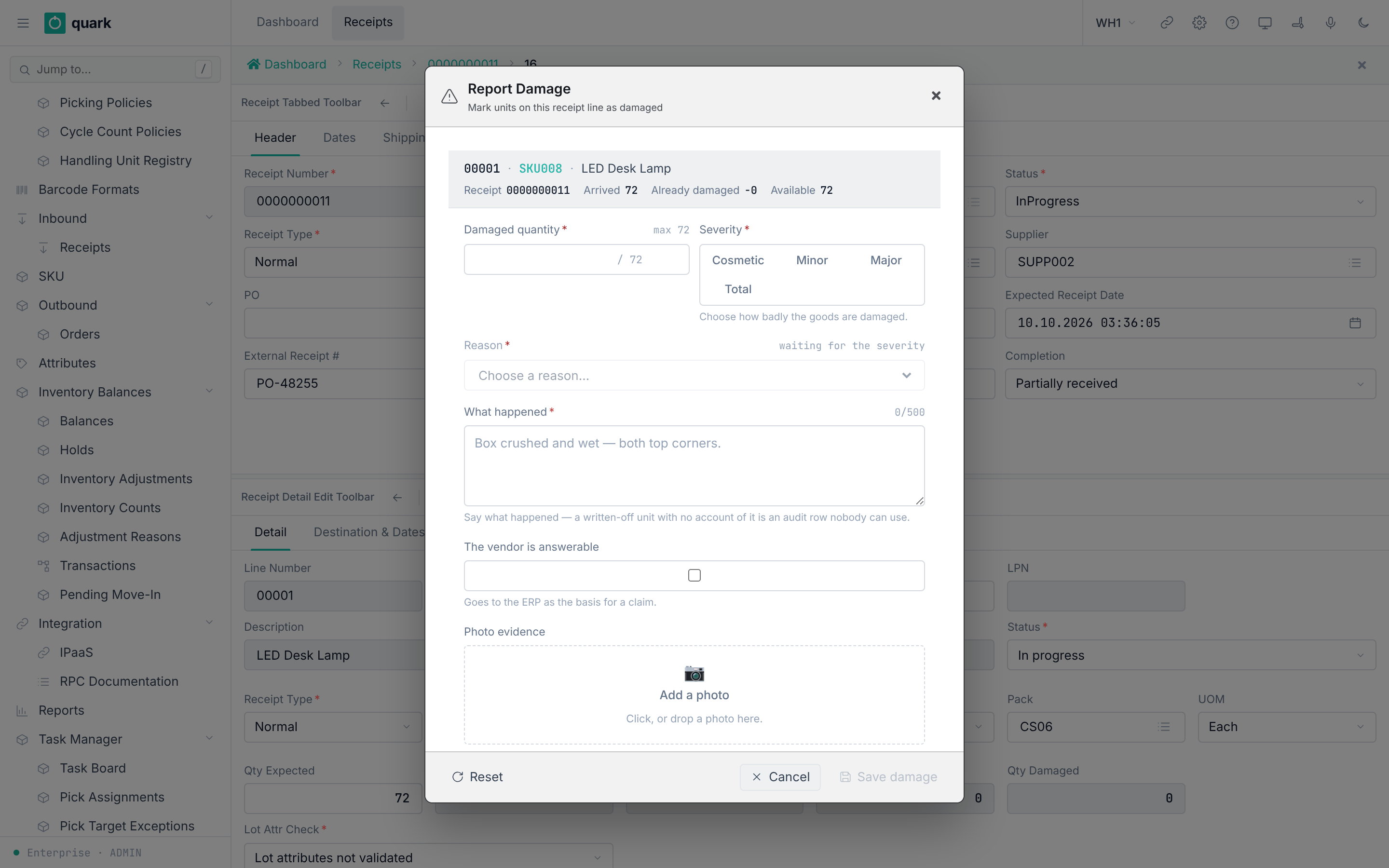
The button Reset clears what you typed. Cancel closes the window.
Severities and reasons
| Severity | Text under the buttons | Reasons |
|---|---|---|
Cosmetic | Saleable — the packaging is marked, the goods are not. | Scratched packaging, Faded label, Dust or dirt, Bent corner, Other |
Minor | Saleable — recorded, and nothing is moved or held. | Torn packaging, Damaged in transit, Dented packaging, Loose seal, Other |
Major | Goes to inspection, and the plate is held. | Crushed, Wet, Temperature breach, Broken seal, Contents damaged, Other |
Total | Written off — goes to the damage bay. | Contamination, Destroyed, Spoiled or expired, Missing or stolen, Other |
The reasons are values of the code list damage_reason. The tag severity of each value decides the list (crates/libs/wms-lib-sql/sql/wms-app/migrations/001_baseline.sql, code list 1002). Other has no severity and is offered for all.
The texts under the buttons describe the default owner actions. The real effect is set by the owner (see below).
Photos
- Up to 6 photos for one report, each at most 10 MB. Allowed types: JPEG, PNG, HEIC (
crates/libs/wms-inbound/src/service/receipt/ports/photo_store.rs:47-84). - The zone says
Click, or drop a photo here.While a photo is sent it saysSending the photo…. At the limit it saysThis report already holds {n} photos, which is all it can keep. - When no photo storage is set up, the damage is still recorded:
damage photos are not available in this deployment — reporting the damage still works.
What changes
| What | Change |
|---|---|
Table receipt_detail_damage | One new row: quantity, severity, reason, description, your user, time, vendor_responsibility, the action that was applied. The disposition is empty. |
| The action for the severity | Read from the owner (damage_minor_action, damage_major_action, damage_total_action). Cosmetic uses the Minor action. See the next table. |
| Move | Only when you chose a location, the severity is Major (to the QC location type) or Total (to the damage location type), and the line has a pallet. Cosmetic and Minor never move goods. |
| Receipt | The version goes up. The status does not change. |
| Events | An event with the damage record, severity, reason and user. The ERP can use vendor_responsibility for a claim. |
Owner actions (code list damage_action):
| Owner action | Effect when the report is made |
|---|---|
None (default for Cosmetic and Minor) | Only the record. |
Hold (default for Major) | An inventory hold with the code Damaged is put on the pallet of the line. If the line has no pallet nothing is held. |
Reject (default for Total) | Qty Damaged of the line grows by the quantity. The completion is recalculated. |
WriteOff, RTV, Repurpose, Destroy | Not run. The record is made and a warning is logged. The result says the action was None. |
Source: crates/libs/wms-inbound/src/service/receipt/damage/report_damage.rs:770-960.
Not confirmed by code: that the stock of the damaged units is separated from good stock. The code records the damage and optionally holds or moves the whole pallet. It does not split the quantity. To verify: report 1 of 10 units as
TotalwithReject, and look atBalancesfor the line.
The quantity limit
The largest damaged quantity is: units that arrived − units already reported damaged.
Units that arrived are received + rejected + damaged on arrival. Damage counted by Reject is not counted twice.
The strip shows these numbers. If you type more, the window refuses it and the button stays grey.
The strip can show -0 for Already damaged when nothing is damaged yet (see the screenshot). The value is zero.
What can go wrong
| Message | Meaning | Fix |
|---|---|---|
You may not report damage on this receipt. | Your role may not run the command. | Ask an administrator. |
This dialog opens on a receipt line, and none was selected. | The window was opened without a line. | Open it from the line card. |
Say what happened — a written-off unit with no account of it is an audit row nobody can use. | What happened is empty. | Write a description. |
The warehouse has no location of the type this severity needs. The damage is recorded; the goods stay where they are. | No QC or damage location exists. | Add the location, or accept that the goods do not move. |
damaged_qty must be > 0, got {n} | The quantity is 0 or negative. | Type a quantity above 0. |
damaged_qty {n} exceeds what is available on this line: arrived {a}, already reported damaged {b}, available {c} | Too many units. | Type a smaller quantity. |
reason_code '{code}' is not a valid damage_reason | The reason is not in the list. | Choose from the list. |
receipt id={id} is in terminal state {status} — cannot report damage | The receipt is closed or cancelled. | Nothing can be reported. |
invalid state for operation: status=OnHold, op=ReportDamage | The receipt is on hold. | Release the hold first. |
a damage photo must be {types} — "{type}" is not accepted | The file type is wrong. | Use JPEG, PNG or HEIC. |
a damage photo may be at most 10 MB; this one is {n} MB | The file is too large. | Use a smaller photo. |
that file is empty — there is nothing to upload | An empty file. | Choose another file. |
the photo store could not be reached — reporting the damage still works | The photo store is down. | Report without photos. |
| A refusal of the move | The destination refuses the pallet. | Choose another location or release the hold. |
After a report the receipt cannot be closed until the record has a disposition. See Damage Records tab and Closing a receipt.
Related pages
- Damage Records tab
- Line detail tab
- Closing a receipt
- Administrator guide: Inbound setup, damage
- API:
receipt_report_damage,receipt_damage_context,receipt_damage_vocabulary,receipt_damage_destination,receipt_damage_photo_upload_url - RF terminal: key
F4(Damage) onRCASN01SUM, screensRCASN01_DMG_SKUandRCASN01_DMG_LINE. See Damage and receipt close.