Inbound Setup
Inbound covers receipts (ASN and other receiving documents), quantity tolerances, damage handling, holds and putaway.
1. Receipts
What you will do
Create a receiving document with lines, so the floor can receive against it.
The product uses one document type for all receiving: the receipt. An advance ship notice (ASN) is a receipt that has expected lines. There is no separate ASN screen in the menu.
Before you start
- Role:
ADMIN,MANAGER,SUPERVISORorOPERATOR(receiving API methods are granted to all four). - The owner, the SKUs and the supplier exist.
- The owner's
WH Settingsare filled (04-owners-sku-uom-pack-hierarchy.md, section 2).
Steps
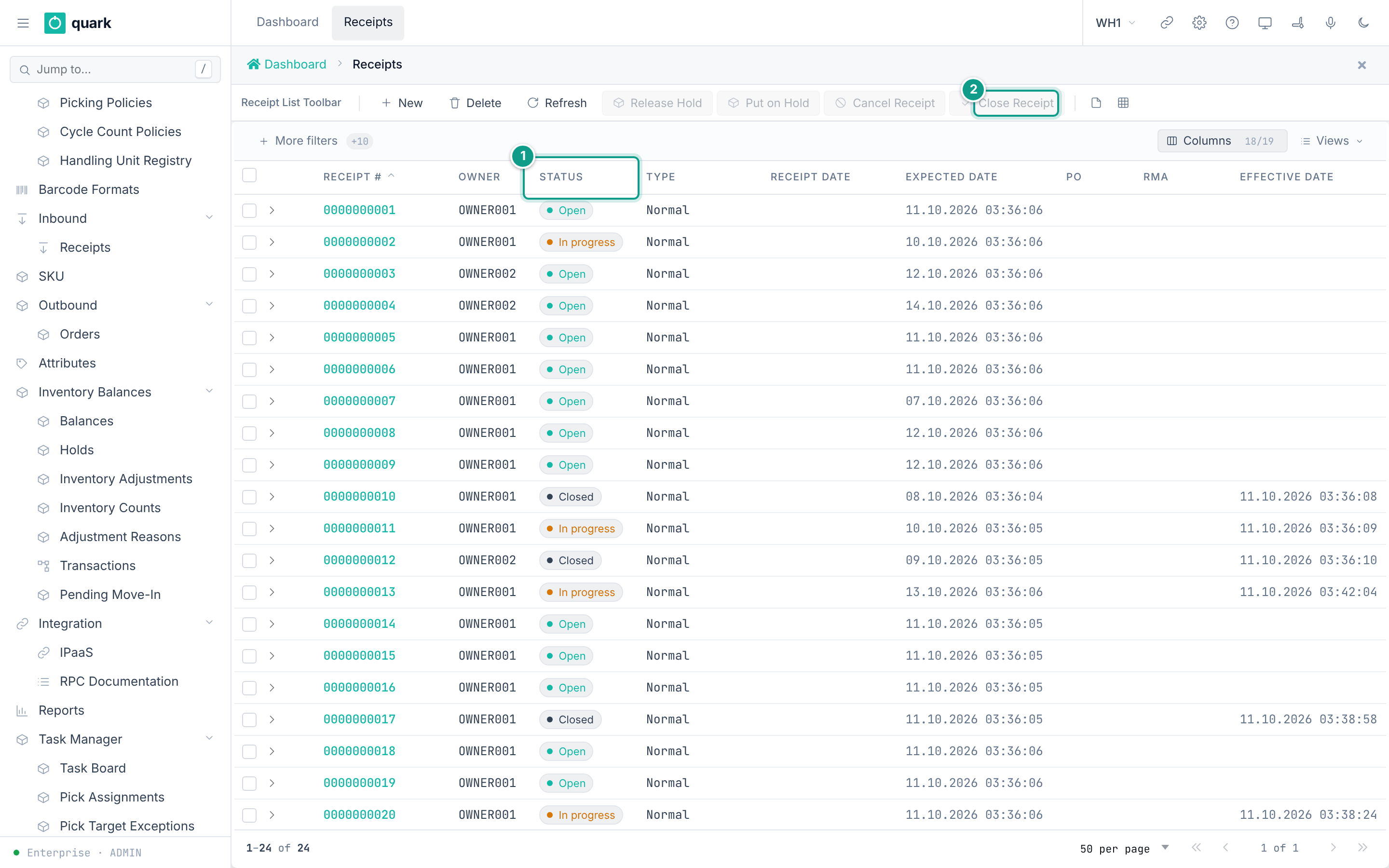
- Open
Sidebar > Inbound > Receipts. - Click
New. - Tab
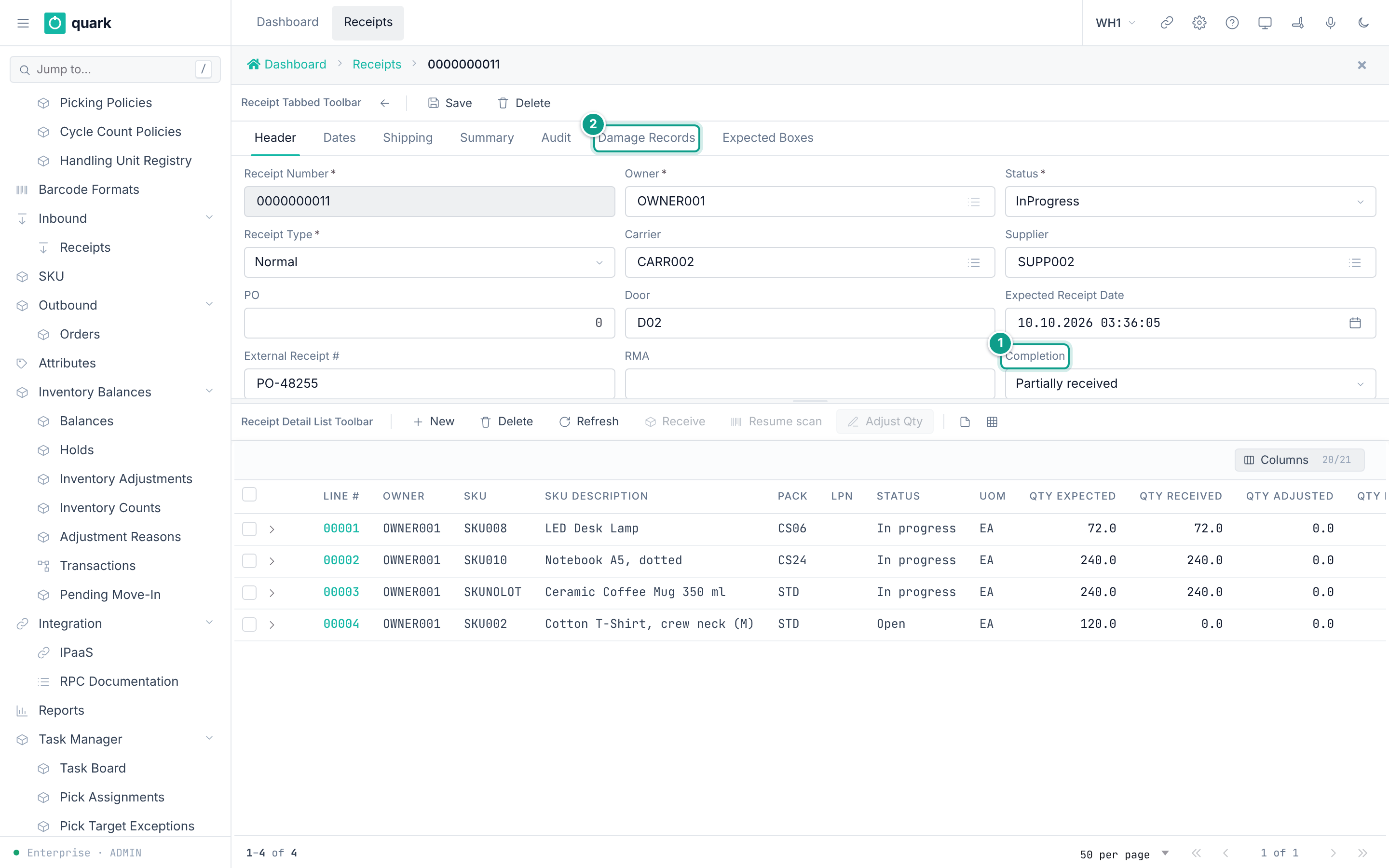
Header: fillReceipt Number,Owner,Receipt Type,Supplier,Carrier,Expected Receipt Dateand the other fields you know. - Tab
Datesand tabShipping: fill what you know. - Click
Save. - In the list
Receipt Lines, clickNew. FillSKU,UOM,Qty ExpectedandPack. ClickSave. - Optional: on the line, open the tab
Expected Lot Attributes,Pre-Advised SerialsorDestination & Dates. - To receive on the web: select a line and click
Receive. The windowReceive lineopens. UseReceiveorReceive & next.
Field reference
Tab Header (receipt_header_form):
| Field | Meaning | Allowed values | Example |
|---|---|---|---|
Receipt Number (required) | Document number. Unique (receipt_receipt_number_key). | Text. | ASN-1001 |
Owner (required) | Owner of the goods. | An owner. | OWNER001 |
Status | State. | Open, InProgress, OnHold, Closed, Cancelled. Default Open. | Open |
Receipt Type | Kind of receipt. | Normal, CustomerReturn, InterFacilityTransfer, Sscc, CaseLevel. Default Normal. | Normal |
Carrier | Carrier. | An owner of type carrier. | |
Supplier | Supplier. | An owner of type supplier. | SUPP001 |
PO | Purchase order id. | Whole number. | |
Door | Dock door text. | Text. | D1 |
Expected Receipt Date | Planned arrival. | Date and time. | |
External Receipt # | Id in the ERP. | Text. | |
RMA | Return authorization. | Text. | |
Completion | Read-only result. | Pending, Partial, Full, Over. | Pending |
Tab Shipping: Vehicle Plate, Vehicle Date, Driver Name, Trailer Plate, Trailer Type, Temperature, Total Weight, Total Volume.
Tab Dates: Receipt Date, Effective Date, Close Date, Arrival Date, Actual Ship Date, Scheduled Ship Date, Promised Ship Date, Planned Ship Date.
Tab Summary (read-only): Completion, Version, Close Summary, Cancel Summary.
Other tabs: Audit, Damage Records, Expected Boxes (buttons Move Boxes, Cancel Box).
Receipt line, tab Detail (receipt_detail_fields_form):
| Field | Meaning | Allowed values | Example |
|---|---|---|---|
SKU (required) | Item. | A SKU of the owner. | WIDGET-1 |
Owner (required) | Owner. | An owner. | |
Receipt Type (required) | Type of the line. | As the header. | |
UOM | Unit of the line. | A UOM. | EA |
Qty Expected | Planned quantity. | Number. | 100 |
Pack | Pack of the line. | A pack. | STD |
Lot Attr Check (required, read-only) | How lot attributes are checked. | Disabled, Advisory, Strict. | Disabled |
Qty Received, Qty Adjusted, Qty Rejected, Qty Damaged | Counters. Read-only. | Numbers. | |
Completion, Target Disposition | Read-only. Target Disposition: Stock, CrossDock, Hold. | Stock |
Line, tab Destination & Dates: Manufactured Date, Delivery By Date, Best By Date, To Lot, To Location, To LPN, Expiration Date.
Line, tab Physical & PO: Temperature, PO, PO Detail, QC Required, QC Status.
Buttons on the receipt list and their windows:
| Button | Window | Fields |
|---|---|---|
Put on Hold | Put Receipt on Hold | Hold reason (required; list of active, enforcing hold codes), Comments. Holding a receipt also holds every line that is not closed or cancelled. |
Release Hold | none | Releases the hold. |
Cancel Receipt | Cancel Receipt | Reason (required). Cancelling is final and cascades to every line not already closed. |
Close Receipt | Close Receipt | Closing is final. A shortage or excess goes into the close summary. If a discrepancy needs a supervisor, Supervisor username and Supervisor password appear. |
Adjust Qty (line) | Adjust Received Qty | Correct Qty (required), Reason (required), Comment. |
Receiving codes you will meet (ReceiptValidationReturnCode):
| Code | Name | Meaning |
|---|---|---|
| 22 | ReceiptWithoutAsnDoc | Receiving with no ASN is not allowed by the policy. |
| 24 | NoSkuOnAsn | The SKU is not on the ASN. |
| 25 | ReceiptWithoutLpn | An LPN is required. |
| 27 / 29 | QtyExcess / PoQtyExcess | More than expected (ASN / PO). |
| 28 | QtyShortage | Less than expected at close. |
| 30 | QtyNotPackMultiple | Quantity is not a multiple of the pack. |
| 35 to 37 | LotAttributeMissing / Mismatch / FormatInvalid | Lot attribute problem. |
| 45 to 49 | Date codes | Expiration too soon or passed, manufactured too old, delivery-by passed, best-by passed, expiration missing. |
| 50 / 51 | TemperatureOutOfRange / TemperatureRequired | Temperature rules. |
| 55 to 60 | Container codes | Mixing, hierarchy or SSCC problems. |
| 70 | InvalidStateForOperation | The receipt state does not allow the action. |
| 71 | CannotCloseWithExceptions | Close needs a supervisor override. |
| 72 | CannotCancelWithInventory | Cancel is refused because stock was received. |
| 73 | CannotCloseWithOpenSerialEpisode | An open serial capture blocks close. |
| 76 | DestinationLocationHeld | The destination location has an enforcing hold. |
| 77 | CannotCloseWithPendingDamage | A damage record has no disposition yet. |
What you should see
- The receipt in the list with status
Open. - After receiving,
Qty Receivedgrows andCompletionchanges toPartial,FullorOver.
If something goes wrong
| Message | Meaning | Fix |
|---|---|---|
Duplicate key receipt_receipt_number_key | The number exists. | Use another number. |
| Code 71 | Close needs a supervisor. | Enter supervisor credentials in the window. The supervisor needs the right receipt.override_close_discrepancy. |
| Code 72 | Stock was already received. | Adjust or close instead of cancelling. |
| Code 77 | Damage has no disposition. | Decide the disposition (section 3). |
cannot {to} an order in status {from} style messages | The action does not fit the status. | Check the Status. |
What this affects later
-
Received stock creates balances and a putaway need.
-
Closing seals the receipt and sends events to subscribers.
-
A manual line with no
Packtakes the SKU's pack (F-20), the way lines made by receiving or by ASN load do. APackyou choose is checked and kept. (Before F-20 a save without it was refused by the database.) Lines made by receiving or by ASN load take the pack from the SKU.
2. Receipt policy (tolerances)
What you will do
Set how strict receiving is about missing documents, quantity, pack multiples and dates.
Before you start
- Role:
ADMINorMANAGER(write). - Seeded policy:
STD("Std Receipt Policy"). It allows everything and checks no quantity.
Steps
- Open
Sidebar > Policy > Receipt Policy. - Click
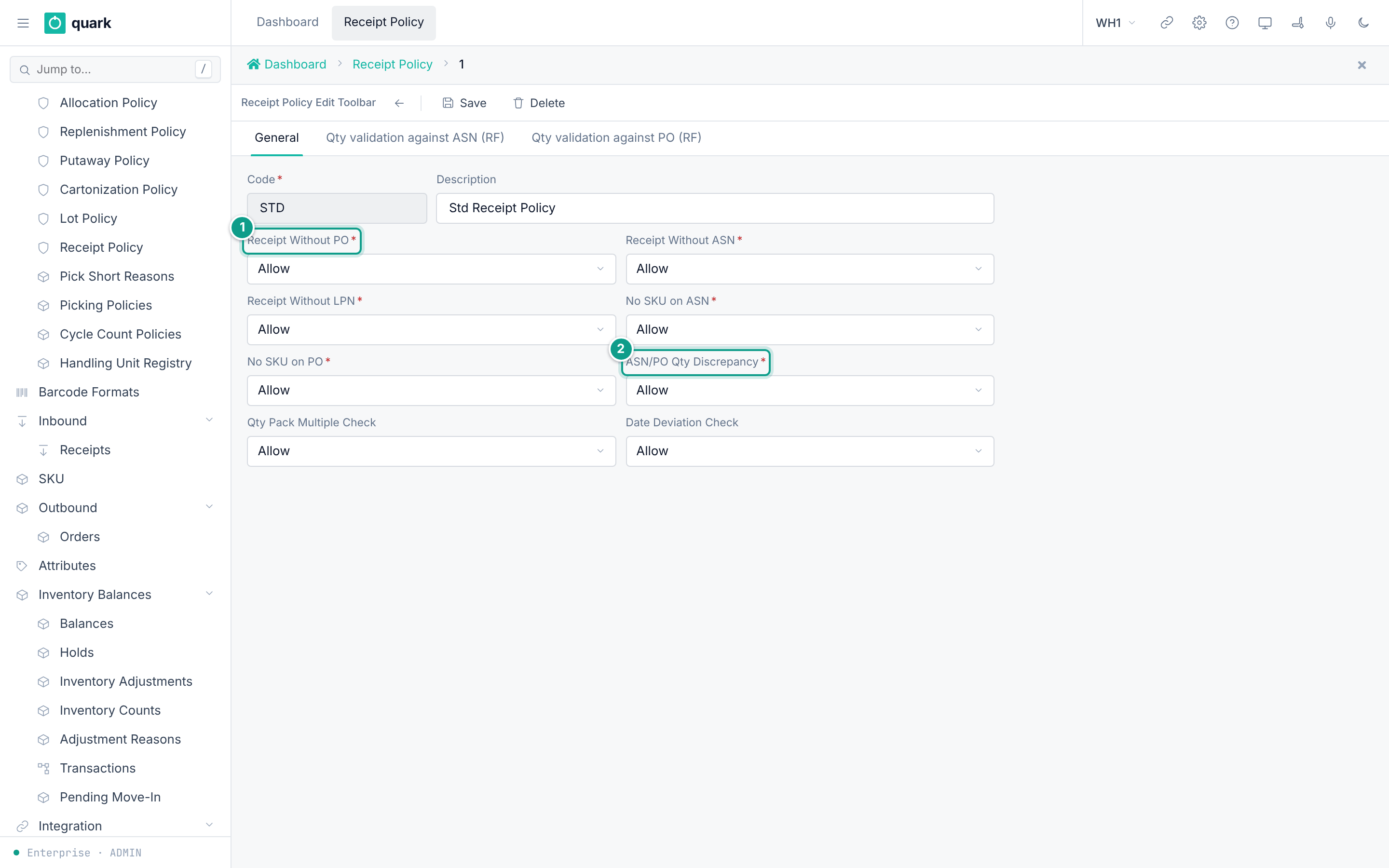
New. Open the tabGeneral. Fill the fields. - Open the tab
Qty validation against ASN (RF). Set limits. - Open the tab
Qty validation against PO (RF). Set limits. - Click
Save. - Assign the policy to SKUs (SKU tab
Policies, fieldReceipt Policy).
Field reference
Tab General:
| Field | Meaning | Allowed values | Example |
|---|---|---|---|
Code (required) | Key. | Text. | STRICT |
Description | Free text. | Text. | |
Receipt Without PO (required) | What to do when no PO. | Allow, HardError, Warning. | Warning |
Receipt Without ASN (required) | When no ASN. | Same. | HardError |
Receipt Without LPN (required) | When no LPN. | Same. | Allow |
No SKU on ASN (required) | SKU missing on the ASN. | Same. | HardError |
No SKU on PO (required) | SKU missing on the PO. | Same. | Allow |
ASN/PO Qty Discrepancy (required) | ASN and PO quantities differ. | Same. | Warning |
Qty Pack Multiple Check | Quantity not a pack multiple. | Same. | Allow |
Date Deviation Check | Dates out of the SKU rules. | Same. | Allow |
Values: Allow = accept. Warning = warn, the operator can go on. HardError = refuse.
Tabs Qty validation against ASN (RF) (form title ASN Qty Validation) and Qty validation against PO (RF) (form title PO Qty Validation). The PO tab uses the same fields with the prefix po_:
| Field | Meaning | Allowed values | Example |
|---|---|---|---|
Execute Qty validation | Level of the check. | None, Sku, Lot (code list RECQTYVAL). Seed None. | Sku |
Excess Message | Show a message on excess. | On or off. | on |
Excess Override | Excess above the limit needs an override. | On or off. | on |
Excess Override % | The limit for the soft check. | Whole number. | 5 |
Excess Error | Excess above the limit is refused. | On or off. | on |
Excess Error % | The limit for the hard check. | Whole number. | 10 |
Shortage Message | Show a message on shortage. | On or off. | on |
Shortage Override | Shortage needs an override. | On or off. | on |
Shortage Override % | The limit. | Whole number. | 5 |
How the excess check works (ExcessLimits in wms-inbound):
- Percent = (received + new − expected) × 100 ÷ expected.
- If percent is above
Excess Error %andExcess Erroris on: refused. - Else if percent is above
Excess Override %andExcess Overrideis on: needs an override. - Else: accepted.
- If nothing was expected: any receive is excess. It is refused when
Excess Erroris on, otherwise it needs an override.
What you should see
- The policy in the list with columns
Code,Description,Without PO,Without ASN.
If something goes wrong
| Message | Meaning | Fix |
|---|---|---|
| Code 27 / 29 with an override request | Excess is above the soft limit. | A supervisor with receipt.override_qty_excess approves. |
| Code 27 / 29 as a refusal | Excess is above the hard limit. | Receive less, or raise the limit. |
| Code 28 | Shortage at close. | A supervisor with receipt.override_qty_shortage approves. |
| Delete refused | SKUs use the policy. | Change the SKUs first. |
What this affects later
- Receiving on RF and web reads the policy of the SKU.
- The system setting
ALLOW_CLOSE_WITH_DISCREPANCY(seed1) lets a supervisor close a receipt that isPartialorOver. - The tab titles say
(RF), but the quantity checks are not RF only. The webReceivewindow and RF call the same method (receipt_receive_against_asn), so the same checks run. When the server asks about an excess or a shortage, the web window shows the question and, for a supervisor, the approval.
3. Damage handling and dispositions
What you will do
Set what happens to damaged goods found at receiving, and know how a damage case is closed.
Before you start
- Role:
ADMINorMANAGER. - Locations of type
QCandDamageexist (seeded:QC,DAMAGE).
Steps
- Open the owner (
Sidebar > Owners). OpenWH Settings > Receiving. - Set
Damage Action: Minor,Damage Action: Major,Damage Action: Total. - Set reasons: open
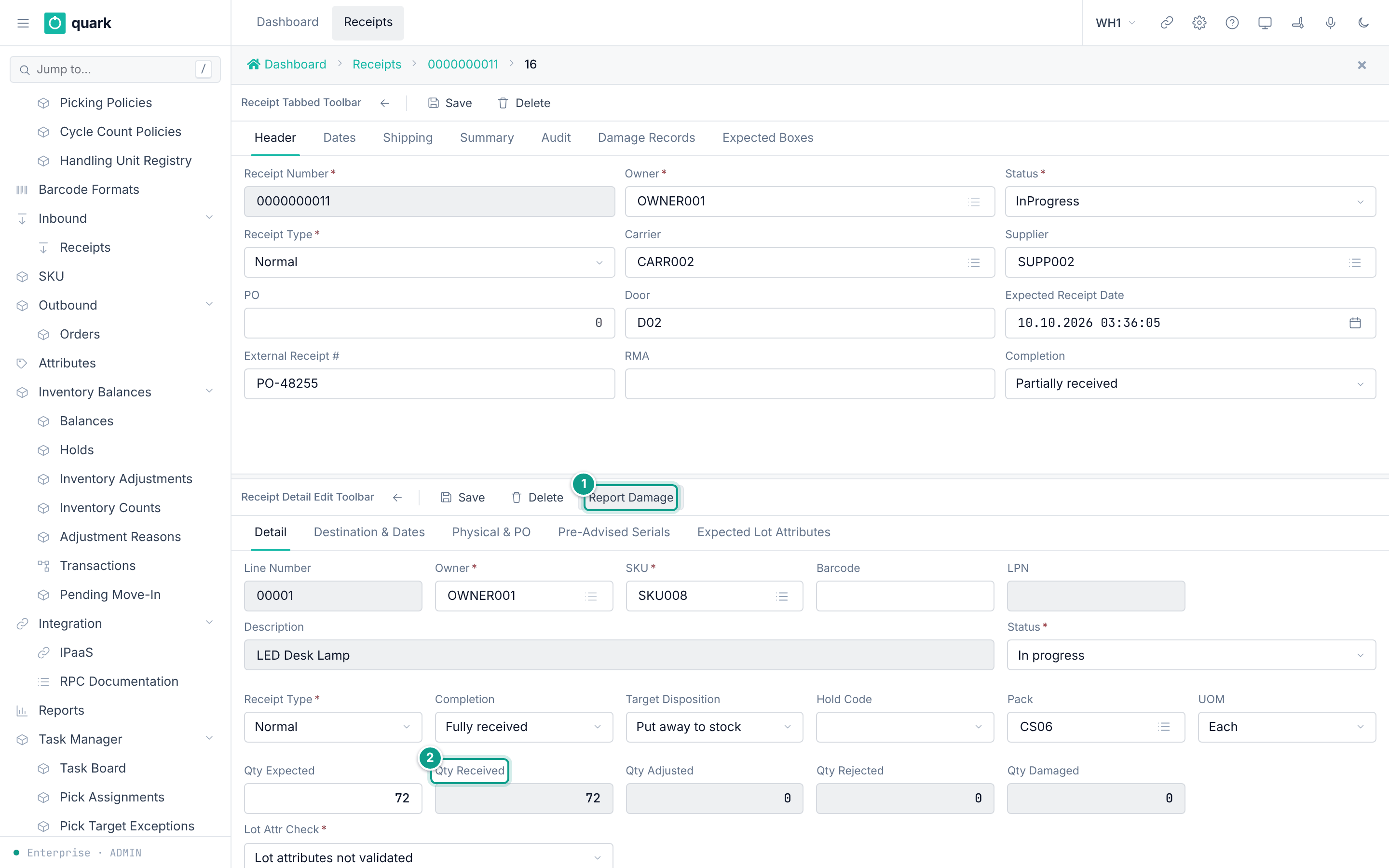
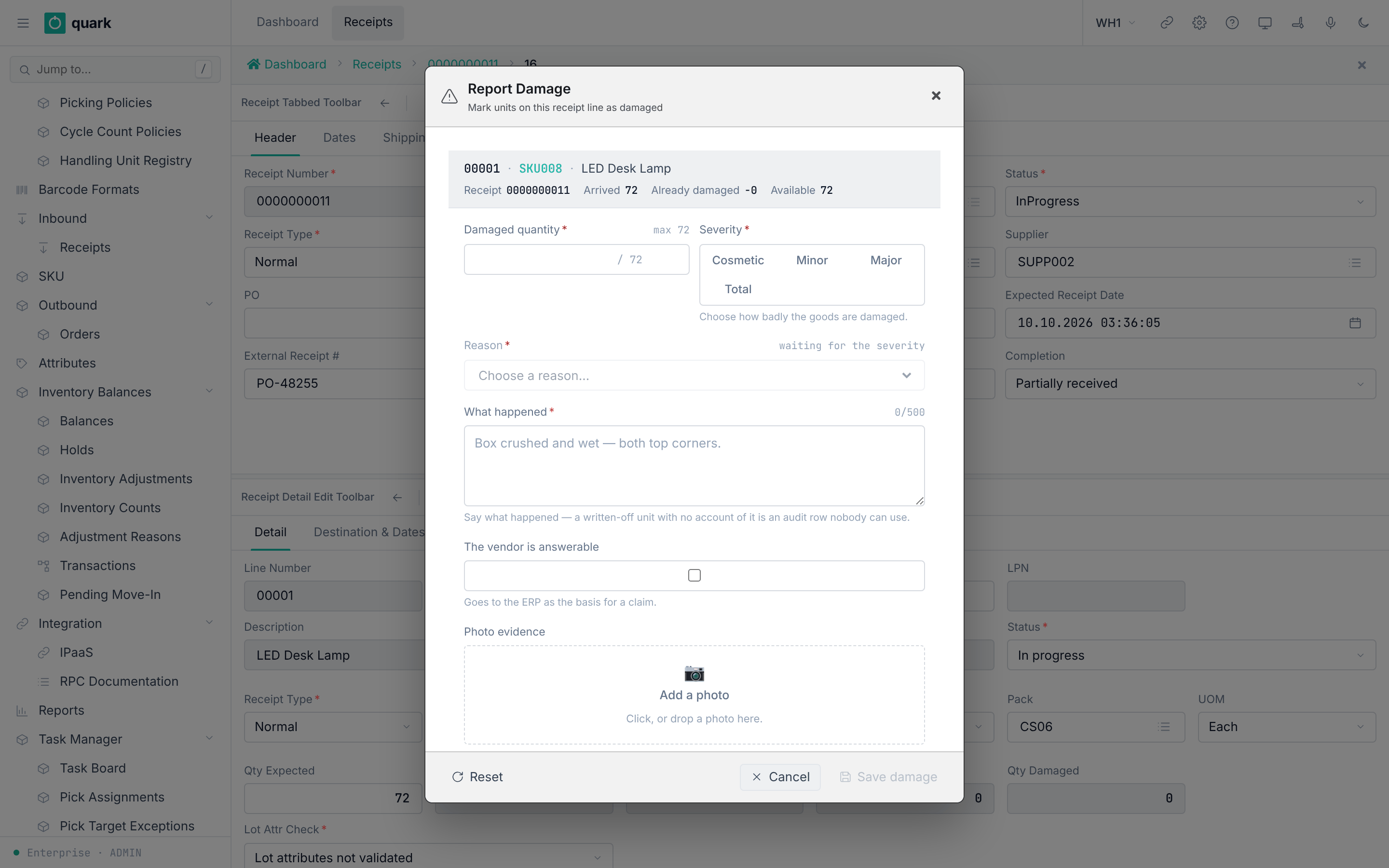
Sidebar > Code > Code Listand edit the listsdamage_reason,damage_severityanddamage_actionif you need other words. - The operator reports damage on a line:
Report Damage. - Close each damage case with a disposition (API or RF; see below).
Field reference
Window Report Damage (report_damage_cmp):
| Field | Meaning | Allowed values | Example |
|---|---|---|---|
Damaged quantity (required) | Damaged units. | Number up to the available quantity. | 3 |
Severity (required) | Level. | Cosmetic, Minor, Major, Total. | Major |
Reason (required) | Cause. List depends on the severity. | Values of damage_reason, for example Crushed, Wet, Torn, TempBreach, TransitDamage, BrokenSeal, Theft. | Wet |
Send the damaged units to | Where damaged units go. Filled from the severity; you can change it. | Major fills the QC location. Total fills the Damage location. Cosmetic and Minor hide the field. | QC |
The vendor is answerable | Sent to the ERP as the basis for a claim. | On or off. | on |
What happened (required) | Free text. | Text. |
Owner actions (code list damage_action): None (no action), Hold (place inventory hold), Reject (reject damaged units). Seed: Minor None, Major Hold, Total Reject.
Dispositions of a damage record (receipt_detail_damage.disposition; empty = still pending):
| Disposition | Set by | Effect |
|---|---|---|
Repurpose | receipt_set_damage_disposition (stateful, per damage record) | Marker only. |
Destroyed | receipt_set_damage_disposition | Marker only. |
WrittenOff | receipt_write_off_damage | Writes the stock off. |
RTV | receipt_move_damage_to_rtv | Moves the stock to a return-to-vendor location. |
The tab Damage Records (columns ID, Line, Qty, Reason, Description, Reported At, Reported By, Severity) is read-only.
There is no web button and no RF screen for the dispositions. Nothing in the web metadata or in the RF client calls them. They are JSON-RPC methods only (receipt_commands_rpc.rs). Use the API (see 09-integrations-and-api.md).
What you should see
- A new row in
Damage Records. Qty Damagedon the line goes up.
If something goes wrong
| Message | Meaning | Fix |
|---|---|---|
| Code 77 on close | A damage record has no disposition. | Set the disposition through the API or RF. |
| Destination refused: a hold forbids it | A location hold blocks the move. | Release the hold, or use the supervisor override. |
What this affects later
- Held stock cannot be allocated (see section 4).
- Written-off and RTV stock leaves available stock.
- A damage photo can be attached from the window if the device allows it.
4. Hold reasons and holds
What you will do
Define the hold reasons your warehouse uses and place a hold.
Before you start
- Role for reasons:
ADMINorMANAGER(write). Role to place holds:ADMIN,MANAGER.
Steps: edit hold reasons
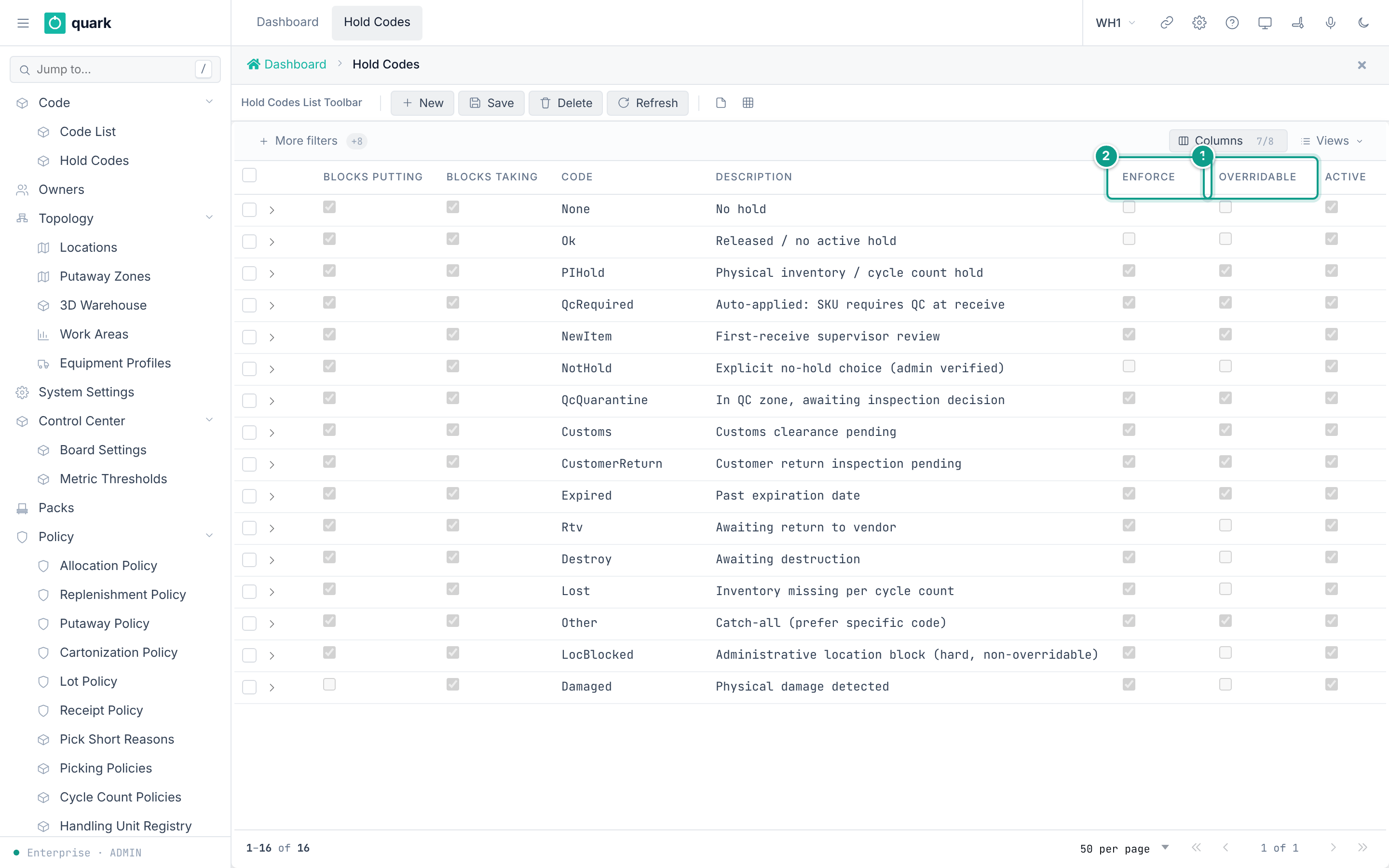
- Open
Sidebar > Code > Hold Codes. - Click
New. Fill the fields. ClickSave.
Steps: place a hold
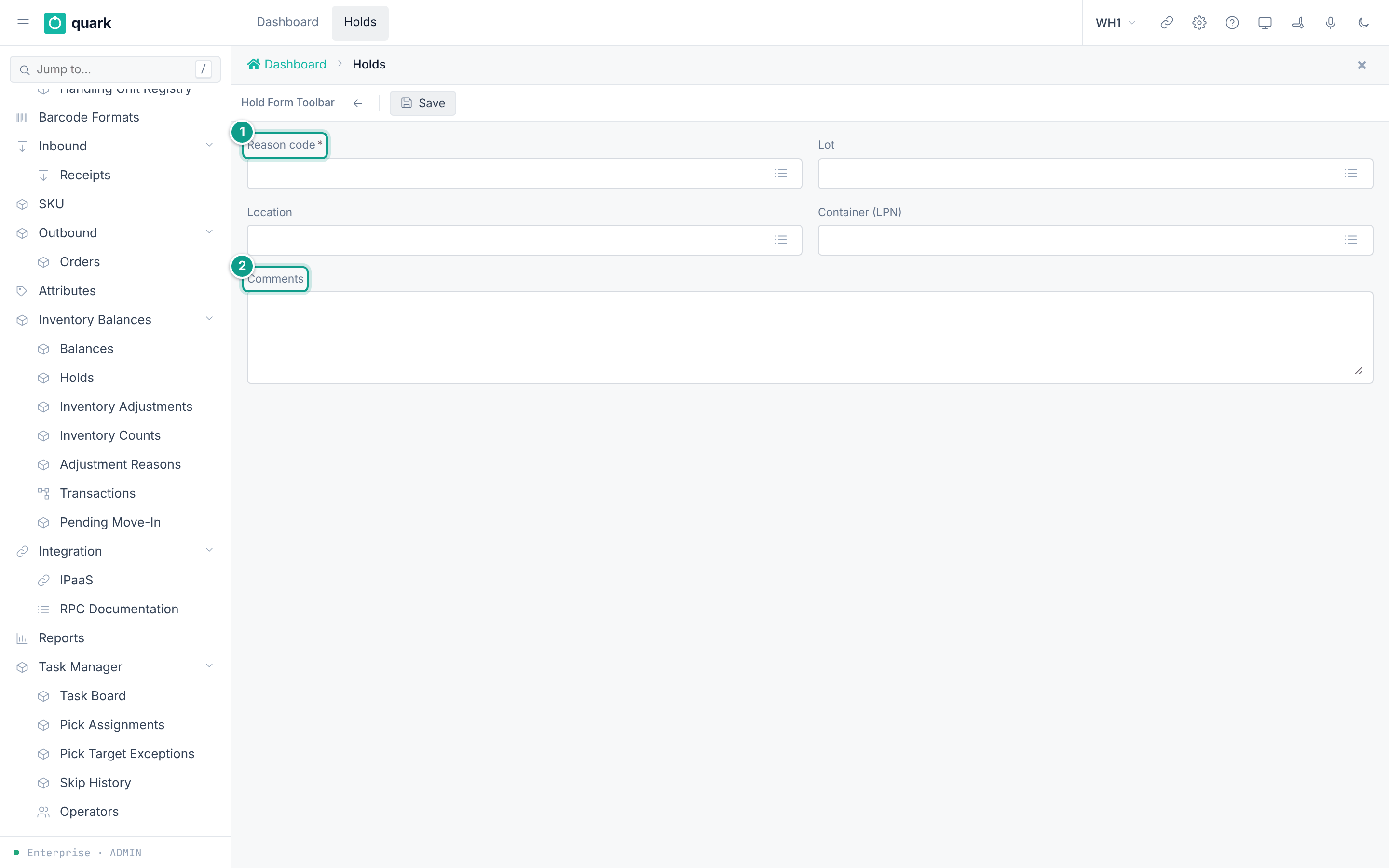
- Open
Sidebar > Inventory Balances > Holds. - Click
New Hold. - Pick a
Reason code. Fill exactly one ofLot,Location,Container (LPN). - Fill
Comments. ClickSave.
Field reference
Hold code (hold_code_normal_form):
| Field | Meaning | Allowed values | Example |
|---|---|---|---|
Code (required) | Key. | Text up to 30 characters. | QcQuarantine |
Description | Free text. | Text up to 100 characters. | |
Rank (required) | Sort and priority number. | Whole number. | 20 |
Enforce | The hold really blocks. Default on. | On or off. | on |
Overridable | A supervisor can override. Default off. | On or off. | off |
Active | In use. Default on. | On or off. | on |
Blocks putting | Forbids putting stock in a place under this hold (receive, target of a move). Default on. | On or off. | on |
Blocks taking | Forbids taking stock from a place under this hold (available stock, allocation, source of a move). Default on. | On or off. | on |
New hold (hold_form): Reason code (required), Lot, Location, Container (LPN) ("Fill exactly ONE of Lot / Location / Container"), Comments.
Seeded hold codes: None, Ok, PIHold, QcRequired, NewItem, NotHold, QcQuarantine, Customs, CustomerReturn, Expired, Damaged, Rtv, Destroy, Lost, Other, LocBlocked.
LocBlocked is "Administrative location block (hard, non-overridable)". PIHold can be acknowledged.
The receipt hold window lists only codes with Active on and Enforce on.
What you should see
- The hold in the list
HoldswithScope,Target,Qty,Started,Auto-release,Reason,By. - A location under a hold shows
Status=Hold.
If something goes wrong
| Message | Meaning | Fix |
|---|---|---|
Code 76 DestinationLocationHeld | An enforcing hold is on the destination. | Release the hold, or use the supervisor override when the code is overridable. |
Foreign key fk_inventory_hold_code | The reason code does not exist. | Add the hold code first. |
| Delete refused | Holds or SKUs refer to the code (fk_sku_receipt_hold_code, fk_sku_lot_hold_code). | Change them first. |
What this affects later
- Setting
MOVE_HOLD_POLICY(seedwarn) decides whether a move asks for an acknowledgement (warn) or goes on (silent). - Allocation skips held stock when the hold has
Blocks takingon.
5. Putaway policy
What you will do
Tell the system where to put received pallets.
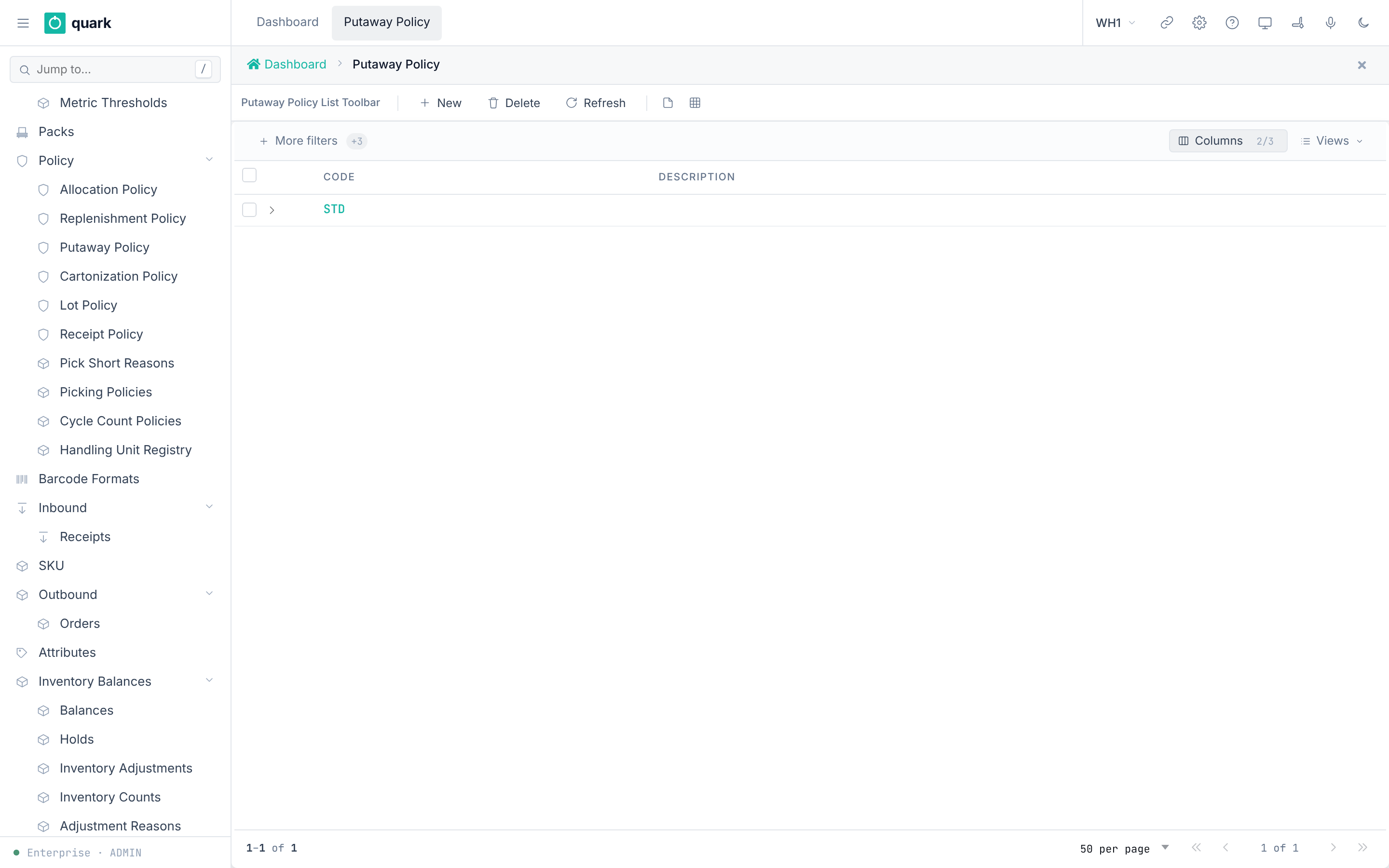
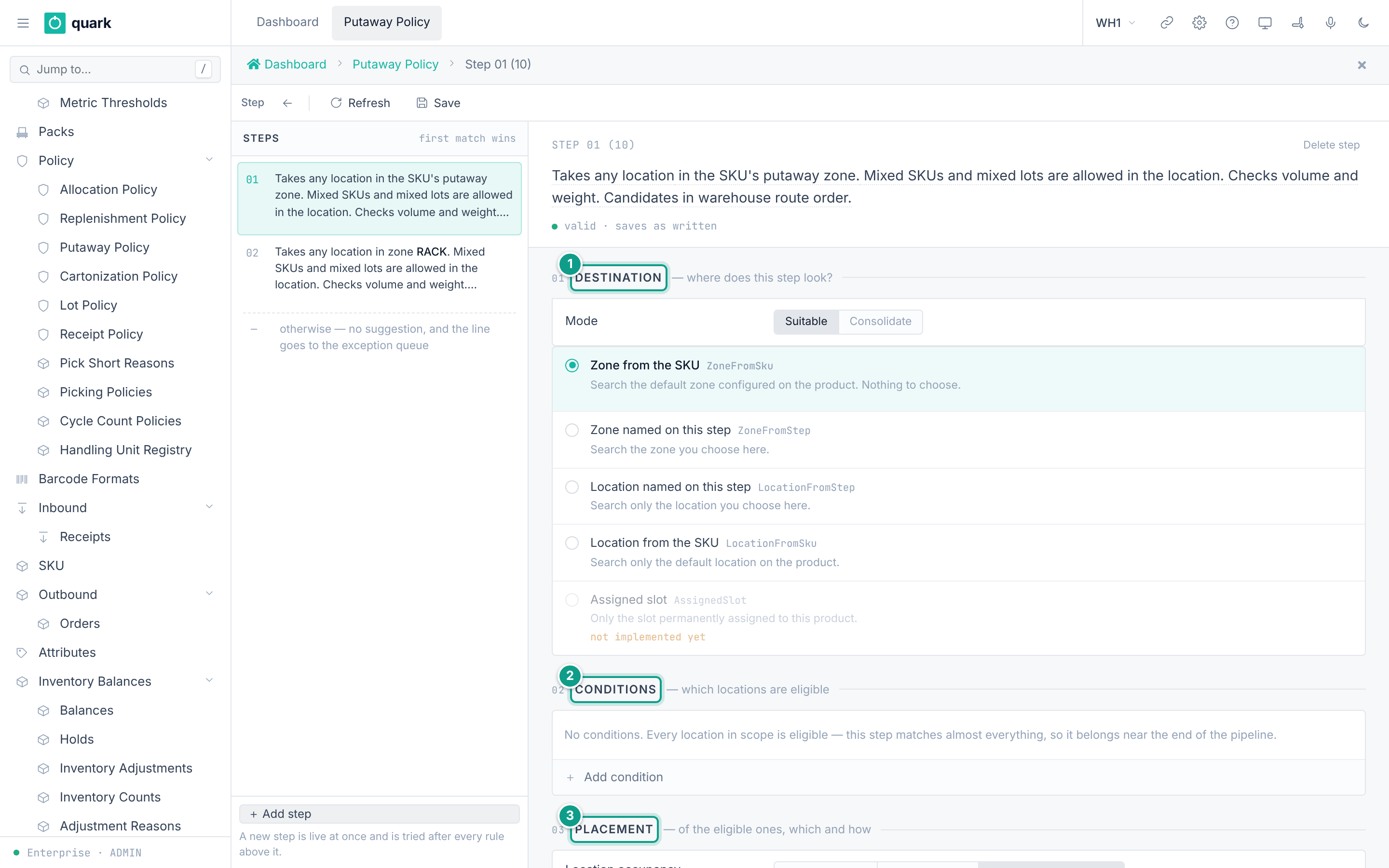
A putaway policy is a list of steps. The system tries the steps from the top. The first step that finds a suitable location wins. If no step finds one, there is no suggestion and the line goes to the exception queue.
Before you start
- Role:
ADMIN,MANAGERorSUPERVISOR(write steps).OPERATORandVIEWERread. - Zones and locations exist (
03-warehouse-structure.md). - The seeded policy
STDhas no steps. An empty policy suggests nothing. You must add steps.
Steps
- Open
Sidebar > Policy > Putaway Policy. - Click
New. FillCodeandDescription. ClickSave. - Open the policy. The step editor opens.
- Click
Add step. A new step is live at once and is tried after every rule above it. - For the step, set the band Destination:
Modeand the search scope. - Set the band Conditions: click
Add condition. Pick a property,isoris not, and values. - Set the band Placement: occupancy, fit checks, temperature, guard, ordering.
- Drag steps to change the order. Put narrow rules first and wide rules last.
- Click
Save. - Use
Dry run: enter an LPN and clickEvaluateto see what the saved policy would do. - Link the policy: SKU tab
Policies(Putaway Policy) or the owner default (Putaway Policy).
Field reference
Policy header (putaway_policy_normal_form): Code (required), Description.
Step fields, from the step editor:
| Field | Meaning | Allowed values | Example |
|---|---|---|---|
Mode | Kind of search. | Suitable (any location with room), Consolidate (a location that already holds this item). | Suitable |
| Scope | Where to look. | Zone from the SKU, Zone named on this step, Location named on this step, Location from the SKU, Assigned slot. | Zone named on this step |
Zone / Location | Anchor for the scope. | An existing zone or location. | RACK |
| Condition properties | Narrow the locations. | Location type, Location status, Location category, Processing type, Location flag, Location ABC, Mixed SKU, Mixed lot, SKU ABC, SKU group, SKU class, Putaway class, Rotation, Lot attribute, SKU attribute, Location attribute. At most 16. | Location type is Pick |
Location occupancy | What the location may hold. | Any occupancy, Must be empty, Allow mixing, with rules. | Any occupancy |
Mixed SKU, Mixed lot | Mixing rules. | Allowed / Not allowed / Any. | |
Fit checks | Refuse a location that cannot take the load. | Cube, Weight, Quantity, Stacking limit, Pallet dimensions. | |
Temperature | The zone range must cover the SKU range. | On or off. | on |
Guard | Hard limit on how far stock travels. | No guard, Stay in the source zone, Stay in the source location. | No guard |
Ordering | Which eligible location is offered first. | Pick route (walking order), Nearest to the assigned slot. | Pick route |
Destination types a putaway may land in: Case, Pick, SpeedPick, Pnd, Sort, Other. Other location types are never offered.
Policy choice for a pallet: first Putaway Policy of the SKU, otherwise the owner's Putaway Policy.
If the SKUs on one pallet point to different policies, putaway refuses the pallet.
Rules the step editor checks before Save:
- A scope that names a zone or location needs that anchor.
- A guard of "source zone" or "source location" needs that anchor.
One lot per locationcannot be used while several SKUs may mix:one lot never spans several SKUs — with mixed SKUs allowed, lots cannot be kept apart.Must be emptycannot be combined with mixing rules.Consolidatecannot be combined withMust be empty:Consolidate places onto a location that already holds this SKU, so it can never be an empty one.- A step that can never run (because an earlier step takes every candidate) shows
never runs. The editor showsclosed by step N (S), where N is the position in the pipeline and S is the stored step number. - A step with no conditions matches almost everything:
No conditions. Every location in scope is eligible — this step matches almost everything, so it belongs near the end of the pipeline.
What you should see
- The message
The steps are saved. - The dry run shows a candidate location, the rule that won and an outcome.
If something goes wrong
| Message | Meaning | Fix |
|---|---|---|
cannot save — {0} | The step breaks a rule above. | Read the reason and fix the step. |
Someone changed this record after you opened it. Look at the current version and make your change again. | Another user saved first. | Refresh and repeat. |
no putaway policy on the SKU or the owner default | Neither the SKU nor the owner names a policy. | Set one. |
LPN spans SKUs with different putaway policies: ... | A mixed pallet has conflicting policies. | Split the pallet or align the policies. |
Dry run: What is on LPN ... resolves to policy X, not policy Y ... | The pallet uses another policy. | Use an LPN whose SKUs use this policy. |
A policy with an empty pipeline suggests nothing. | No steps. | Add steps. |
What this affects later
- The suggested location is reserved for
PUTAWAY_RESERVATION_TTL_MINminutes (seed 15) or the owner's ownPutaway Reservation TTL (min). - A deviation from the suggestion needs an acknowledgement. If
COUNT_ON_PUTAWAY_DEVIATIONis1, the destination location is counted. - Without a working policy, received stock waits and no location is suggested.
The editor texts come from the English translation rows putaway_step.* in the web metadata. The server errors come from crates/libs/wms-inventory/src/putaway/policy.rs.
6. Minimal inbound setup
- One
QC, oneDamageand oneStagelocation (seeded). - One zone with storage locations.
- A putaway policy with at least one step, linked to the owner default.
- One receipt policy (seeded
STD). - Hold code set (seeded).
- One owner with
WH Settingsfilled.