Owners, SKU, UOM, Pack Hierarchy, Lot and Serial Rules
1. Owners (customers, suppliers, carriers)
What you will do
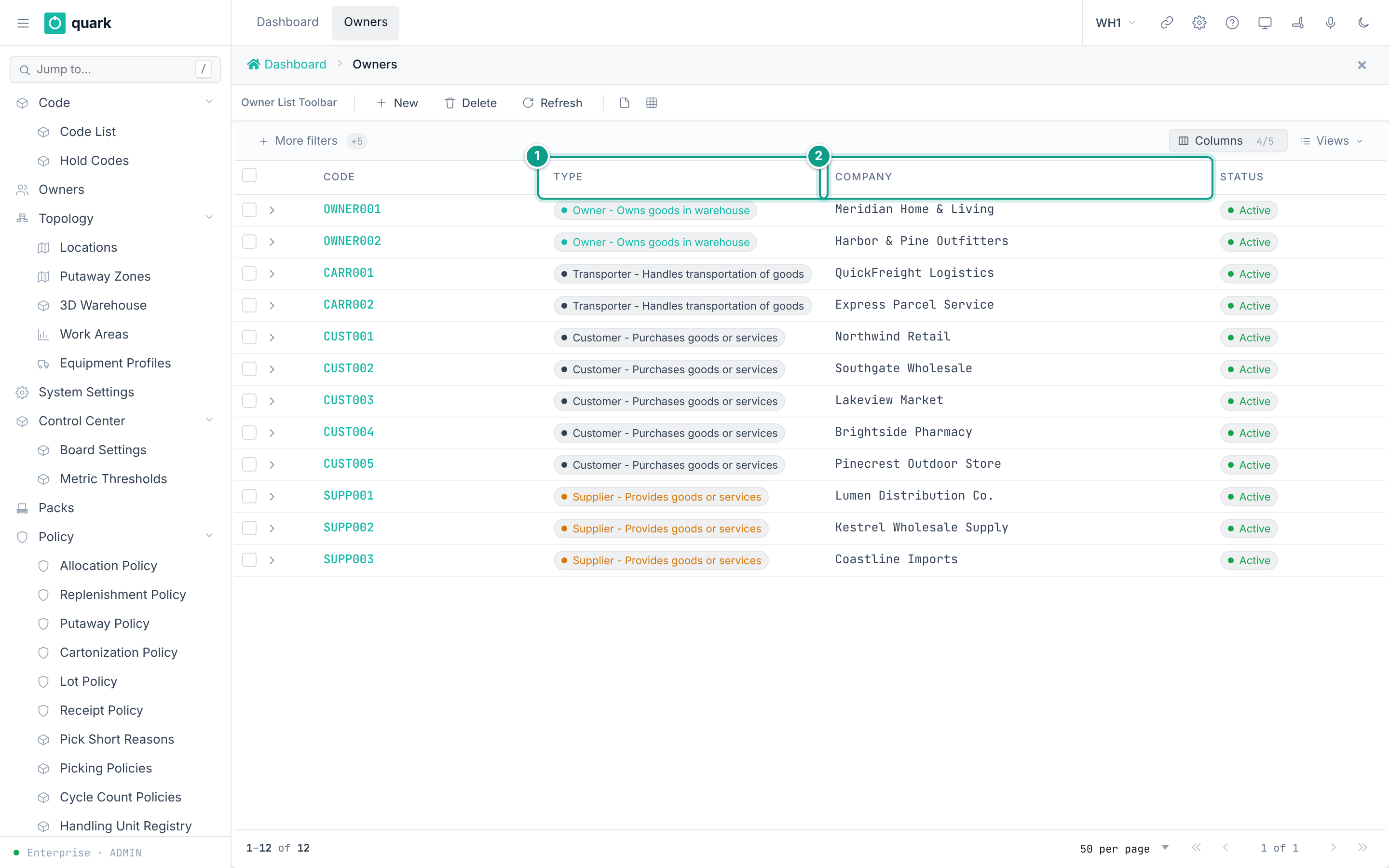
Create a business partner record. The same table holds goods owners, suppliers, carriers, customers and other partners.
The field Type tells which kind it is.
Before you start
- Role:
ADMINorMANAGER(create and delete).OPERATORandVIEWERcan read. - For
Delivery location (picker carrier): a location of typePickto,StageorDoorexists. - For a parent owner: the parent exists.
Steps
- Open
Sidebar > Owners. - Click
New. - On the tab
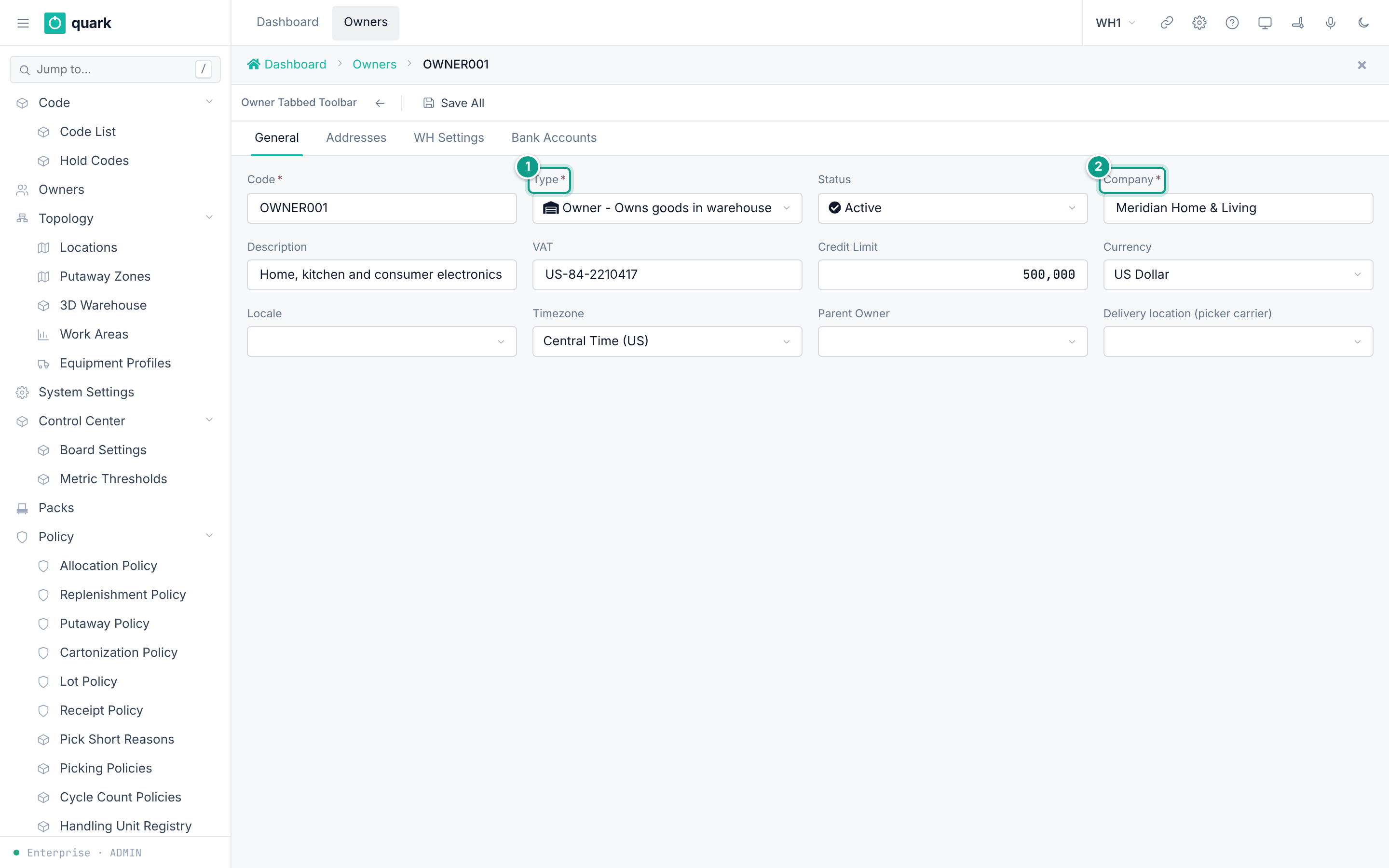
General, fillCode,Type,Companyand the other fields. ClickSave. - Open the tab
Addresses. ClickNew Address. Fill the form. ClickSave. - Open the tab
Bank Accounts. ClickNew. Fill the form. ClickSave. - Open the tab
WH Settings. Fill the five sub-tabs (section 2). - Click
Save Allto store the whole card.
Field reference
Form owner_general_form:
| Field | Meaning | Allowed values | Example |
|---|---|---|---|
Code (required) | Key. Unique in the warehouse. | Up to 30 characters. | SUPP001 |
Type (required) | Kind of partner. | Sup, Cus, Trn, Rec, Con, Own, Man, Dst, Vnd, Brk. | Sup |
Status | State of the partner. | Active, Inactive, Suspended. Default Active. | Active |
Company (required) | Company name. | Up to 45 characters. | ABC Manufacturing |
Description | Free text. | Up to 50 characters. | |
VAT | Tax number. | Up to 18 characters. | VAT111222333 |
Credit Limit | Credit limit. | Number. | 500000 |
Currency | Currency code. | Up to 3 characters (code list CURRENCY, 30 values). | USD |
Locale | Language of the partner. | A code from the locale registry (en, ru, kk). | en |
Timezone | Time zone of the partner. | Text up to 50 characters. | Europe/Berlin |
Parent Owner | Parent in a tree. | Another owner. | |
Delivery location (picker carrier) | Where the picker leaves a carrier's picked goods. | A location of type Pickto, Stage or Door. | PICKTO |
What the types mean (from code and form names):
| Code | Meaning | Evidence |
|---|---|---|
Sup | Supplier | Picker owner_supplier_list_form: "Popup list for owners of type Supplier". |
Trn | Carrier | Picker owner_carrier_list_form: "Popup list for owners of type Carrier". Seeded carriers CARR001 and CARR002 have type Trn. |
Own | Own owner (goods owner) | List owner_own_list_form. |
Vnd | Vendor | List owner_vendor_list_form. |
Cus | Customer | Seeded customers CUST001 and CUST002 have type Cus. List shipment_order_customer_list is the "Ship To" picker. |
Rec | Receiver | Code list OWNER_TYPES: "Receives goods or services". |
Con | Consignee | Code list OWNER_TYPES: "The person or entity to whom goods are shipped". |
Man | Manufacturer | Code list OWNER_TYPES: "Produces goods". |
Dst | Distributor | Code list OWNER_TYPES: "Distributes goods to retailers or customers". |
Brk | Broker | Code list OWNER_TYPES: "Facilitates transactions between buyers and sellers". |
The Ship To picker (shipment_order_customer_list) shows only owners of type Cus. The picker label is Customer List.
Address (owner_address_form): ISO Code, Contact, Phone, Email, Address Type (required), Company, Address 1, Address 2, City, State, ZIP, Country, Default.
Bank account (owner_bank_acct_edit): Bank Name (required), Description, BIC/SWIFT (required), Account/IBAN (required), Correspondent Acct, Currency (required), Default, Active.
What you should see
- The new owner in the list with the columns
Code,Company,Type,Status.
If something goes wrong
| Message | Meaning | Fix |
|---|---|---|
Duplicate key owners_code_key | The code exists. | Use another code. |
owners.picking_toloc X is a Y location, not Pickto/Stage/Door | The delivery location has the wrong type. | Pick a location of type Pickto, Stage or Door. |
| Delete refused | Receipts, orders, SKUs, balances or tasks refer to the owner (ON DELETE RESTRICT). | Close or move those records. Set Status to Inactive. |
Field {0} is required | A required field is empty. | Fill it. |
What this affects later
- Every SKU, receipt, order and stock row belongs to one owner.
SupandTrnowners are chosen on receipts asSupplierandCarrier.- The carrier's
Delivery location (picker carrier)is where picked carrier goods are left.
2. Owner settings for the warehouse (tab WH Settings)
What you will do
Set the defaults the warehouse uses for one owner.
Before you start
- The policies and locations you want to pick exist.
- The owner has a settings row. The seeded owner
OWNER001has one. - A new owner does not get a settings row by itself.
Save Allcreates the row when the settings tabs carry data. If you fill nothing in, no row is made.
Steps
- Open the owner. Open the tab
WH Settings. - Fill the sub-tab
LPN Config. - Fill the sub-tab
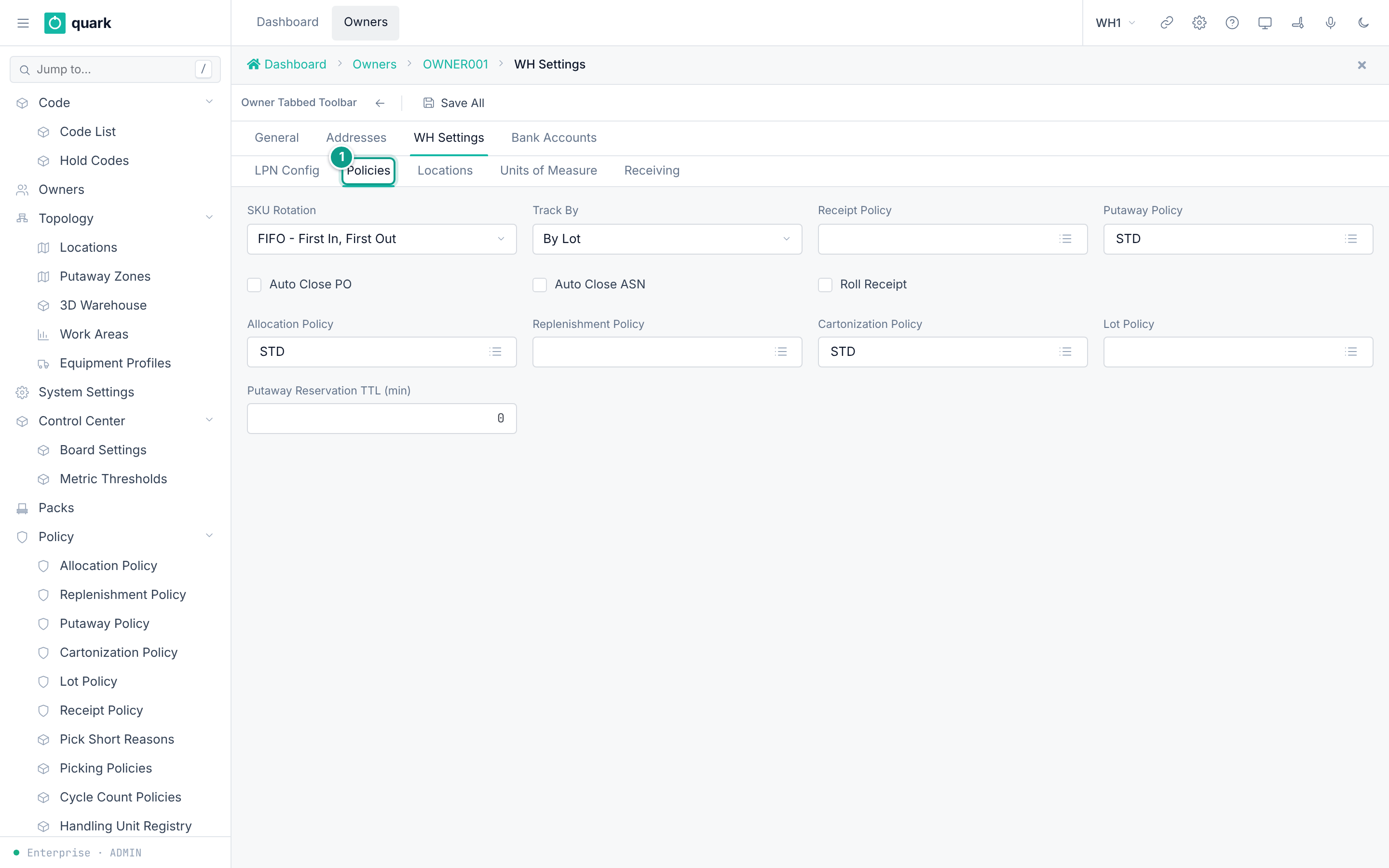
Policies. - Fill the sub-tab
Locations. - Fill the sub-tab
Units of Measure. - Fill the sub-tab
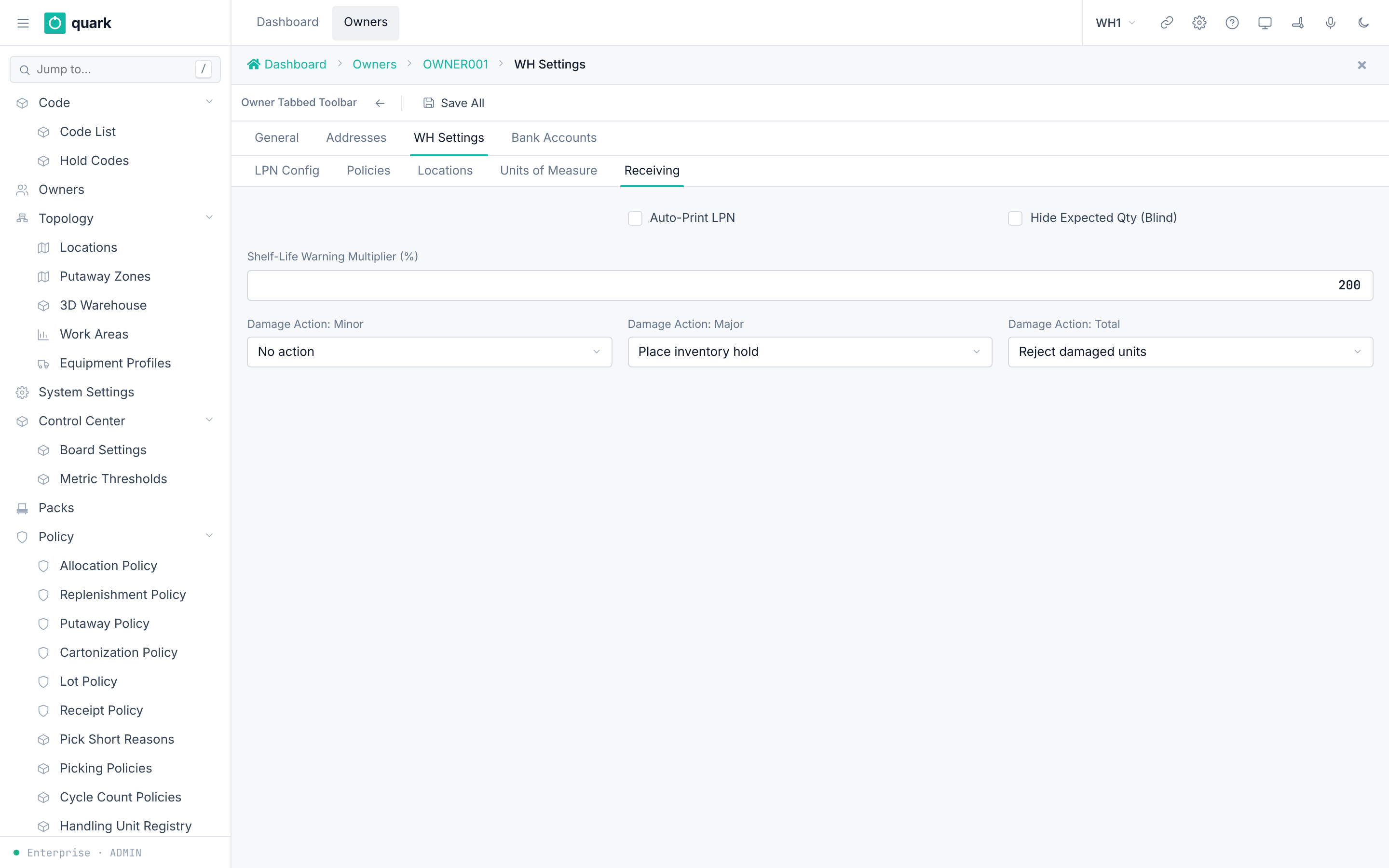
Receiving. - Click
Save All.
Field reference
LPN Config (owner_wh_lpn_form):
| Field | Meaning | Allowed values | Example |
|---|---|---|---|
LPN Length | Length of generated LPN numbers. | Whole number. | 10 |
LPN Start # | First LPN number. | Whole number. | 1 |
Next LPN # | Next number to issue. | Whole number. | 1 |
LPN Rollback # | Number at which the counter goes back. | Whole number. | |
System Generated LPN | The system makes the LPN. Default on. | On or off. | on |
Commingled LPN | Several owners on one LPN. Default off. | On or off. | off |
Duplicate LPN | The same LPN twice. Default off. | On or off. | off |
Mixed LPN | Several SKUs on one LPN. Default off. | On or off. | off |
Policies (owner_wh_policies_form):
| Field | Meaning | Allowed values | Example |
|---|---|---|---|
SKU Rotation | Default stock rotation. | Fifo, Lifo, Fefo. | Fifo |
Track By | How stock is tracked. | None, Lot, Serial, Batch. Default Lot. | Lot |
Receipt Policy | Default receipt policy. | A receipt policy. | STD |
Putaway Policy | Default putaway policy. | A putaway policy. | STD |
Auto Close PO | Close the PO automatically. | On or off. | off |
Auto Close ASN | Close the ASN automatically. | On or off. | off |
Roll Receipt | Combine receipts. | On or off. | off |
Allocation Policy | Default allocation policy. | An allocation policy. | STD |
Replenishment Policy | Owner default replenishment policy. | Stored only; the planner reads the policy on the SKU instead. | |
Cartonization Policy | Default cartonization policy. | A cartonization policy. | STD |
Lot Policy | Default lot policy. | A lot policy. | STD |
Putaway Reservation TTL (min) | Minutes a putaway reservation is held. Blank = warehouse default (PUTAWAY_RESERVATION_TTL_MIN = 15). | Whole number above 0 (chk_owner_config_putaway_ttl). | 15 |
Locations (owner_wh_locations_form): Pick Code, Carton Group, Returns Location, QC Location, Receiving Location. The seeded owner has Receiving Location = STAGE.
Units of Measure (owner_wh_uom_form): Weight UOM, Dimension UOM, Cube UOM. The seeded owner has KG, CM, M3.
Receiving (owner_config_receiving_form):
| Field | Meaning | Allowed values | Example |
|---|---|---|---|
Auto-Print LPN | Print an LPN label after a receive. | On or off. | off |
Hide Expected Qty (Blind) | Operator does not see the expected quantity. | On or off. | off |
Shelf-Life Warning Multiplier (%) | Hint: "200 = 2x min_shelf_life triggers warning". | Whole number. Seed 200. | 200 |
Damage Action: Minor | What to do with minor damage. | None, Hold, Reject. Seed None. | None |
Damage Action: Major | What to do with major damage. | Same. Seed Hold. | Hold |
Damage Action: Total | What to do with total loss. | Same. Seed Reject. | Reject |
What you should see
- The values are saved on the owner.
If something goes wrong
| Message | Meaning | Fix |
|---|---|---|
Check chk_owner_config_putaway_ttl | TTL is zero or negative. | Enter a positive number or leave blank. |
| Foreign key error on a location | The location does not exist. | Create it first. |
What this affects later
- Receiving uses the damage actions and the default locations.
- The default policies are not copied into new SKUs. They are a fallback at run time. If the SKU has no policy of its own, the system uses the owner default. This holds for putaway, allocation, cartonization and receipt policies.
- The replenishment and lot defaults are stored, but no code reads them (checked in Rust code).
3. Units of measure (UOM)
What you will do
Know which units exist and where to add one.
Before you start
- Role:
ADMINorMANAGERto edit code values.
Steps
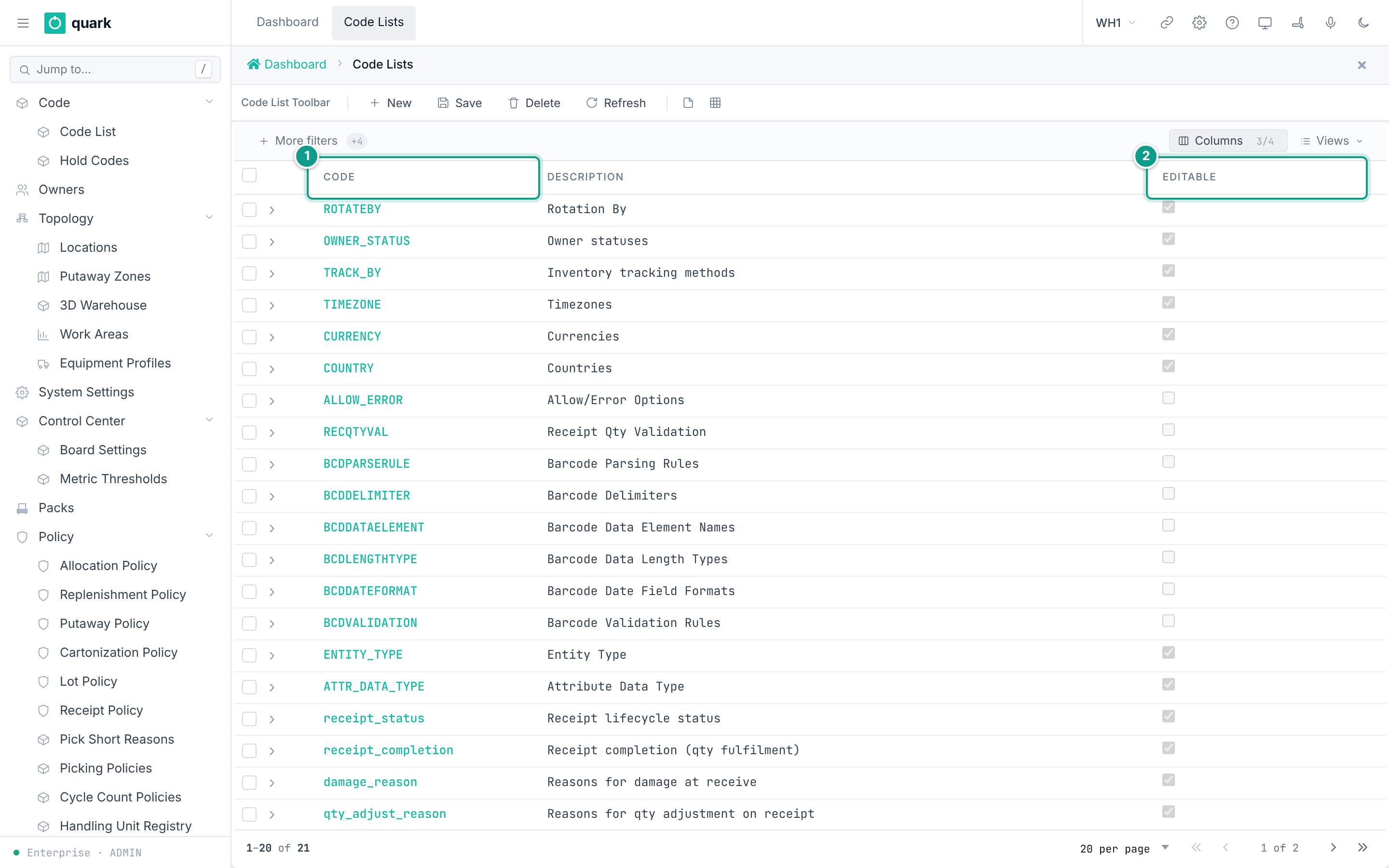
- The 32 seeded units are listed in the code list
UOM: openSidebar > Code > Code List, findUOM. - To add a unit, add a value to the code list (section 3 of
11-faq.mdhas the screen steps). - The class and conversion factor of a unit live in the table
uom_class. No screen edits this table.
Field reference
Seeded units and classes (from the uom_class seed):
| Class | Units |
|---|---|
Handling | EA, IP, CS, PL |
Container | BX, BG, DR, CRT, BDL, TU, TK, CN, RL |
Weight | KG (factor 1), LB (0.45359237), TON (1000), G (0.001), OZ (0.028349523125) |
Length | MTR (1000), FT (304.8), YD (914.4), CM (10), IN (25.4), MM (1) |
Volume | LTR (0.001), GAL (0.003785411784), ML (1e-06), CBM (1), M3 (1), MM3 (1e-09) |
Area | SQM, SQF |
The factor must be above zero (ck_uom_class_factor_positive).
Pack-hierarchy UOMs (EA, IP, CS, PL) are chosen in the pack screens (section 5).
Also set the warehouse base units in enterprise.warehouse (weight_uom, length_uom, volume_uom). They are fixed after first use.
What you should see
- The unit appears in the drop-downs
UoM,Base UOM,Parent UOMandUOM.
If something goes wrong
| Message | Meaning | Fix |
|---|---|---|
| A new unit has no class | The side table has no row. | The step card then says nothing about the unit. Ask the installer to add a uom_class row. |
What this affects later
-
Allocation steps warn when a rule can never be met for a measured unit (weight, length, volume, area).
-
No screen or API method adds a
uom_classrow. The rows come from the database baseline. A new class row needs a database migration.
4. SKU
What you will do
Create an item master record.
Before you start
- Role:
ADMIN,MANAGERorOPERATOR(create, update, delete default). - The owner exists.
- A pack exists (section 5).
- A cartonization policy, receipt policy, allocation policy, replenishment policy and lot policy exist. The SKU form requires all five. The database defaults for receipt, replenishment and lot policy point to id 1.
Steps
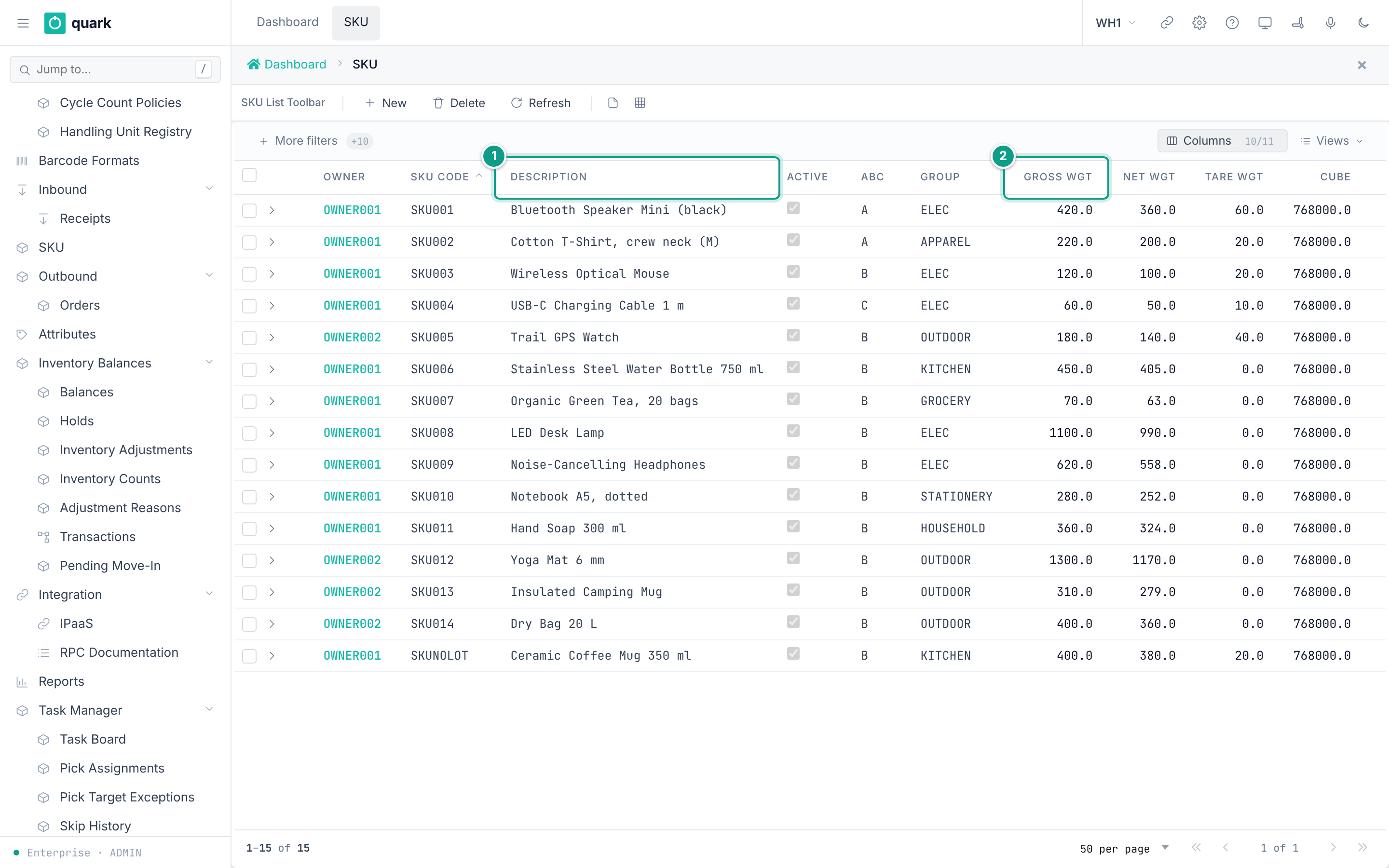
- Open
Sidebar > SKU. - Click
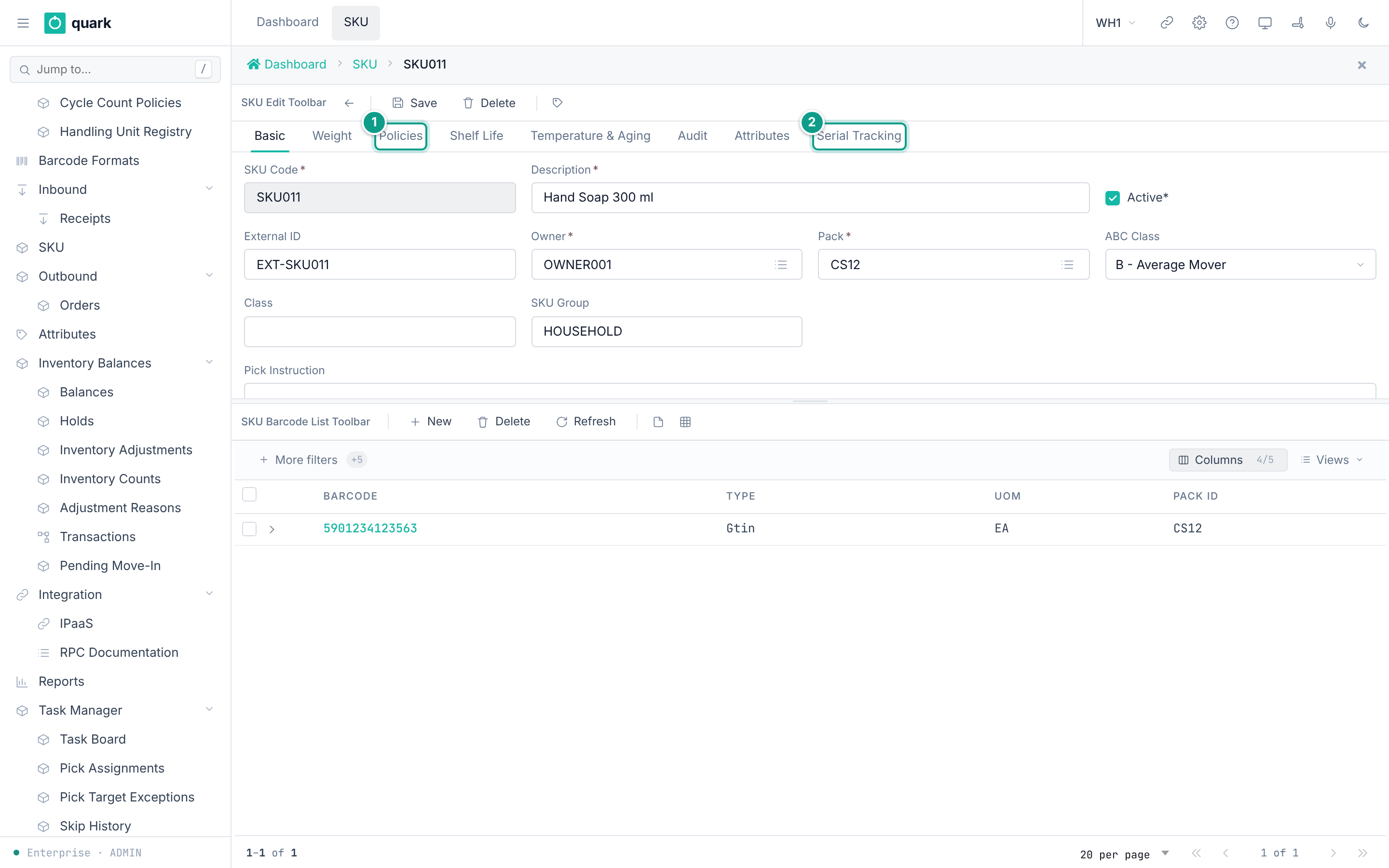
New. - Tab
Basic: fillOwner,SKU Code,Pack,Description,Active. - Tab
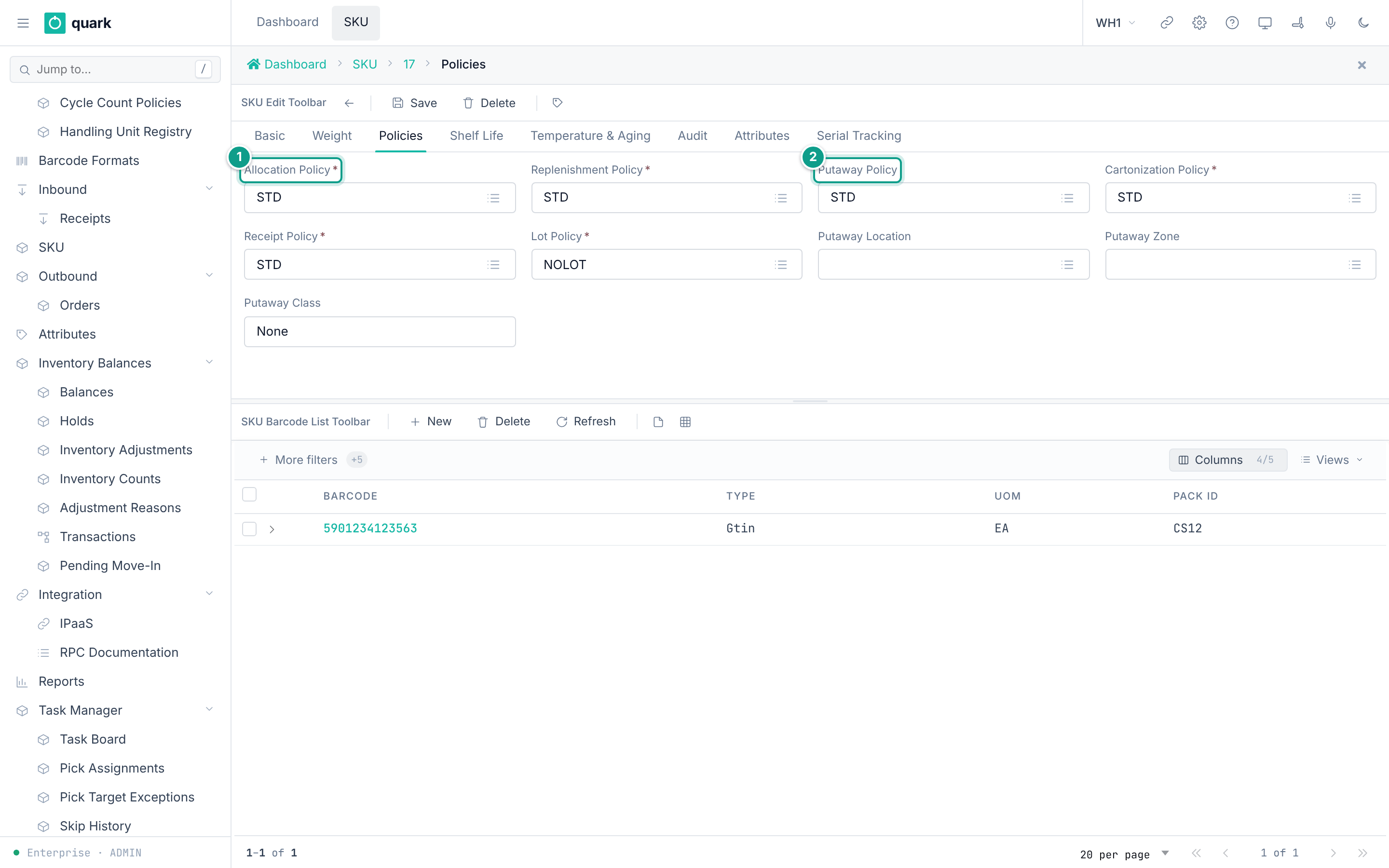
Weight: fillGross Weight,Net Weight,Tare Weight,Cube. - Tab
Policies: pick the five required policies. - Optional tabs:
Shelf Life,Temperature & Aging,Serial Tracking,Attributes. - Click
Save. - Barcodes: open the barcode list of the SKU, click
New, fill the form, clickSave. - Optional: tab
Pick Locations— the locations the SKU is picked from. On a saved SKU clickNewon the tab, choose theLocationin the picker, pickPick TypeandUnit, enterMinandMax, clickSave. To change one, open it with the arrow at the start of its row; to remove one, tick it and clickDelete.
Field reference
Tab Basic (sku_basic_form):
| Field | Meaning | Allowed values | Example |
|---|---|---|---|
Owner (required) | Owner of the item. | An owner. | OWNER001 |
SKU Code (required) | Item code. Unique per owner (uq_sku_owner_code). | Text. | WIDGET-1 |
External ID | Id in the ERP. Unique when set (sku_external_id_key). | Text. | ERP-77 |
Pack (required) | Pack hierarchy of the item. | A pack. | STD |
ABC Class | Speed class. | A, B, C. | B |
Class | Free class text. | Text. | |
SKU Group | Group text. | Text. | |
Description (required) | Name. | Text. | |
Active (required) | In use. | On or off. | on |
Pick Instruction | Text shown to the picker. | Text. |
Tab Weight (sku_weight_form): Gross Weight, Net Weight, Tare Weight, Cube (all required, default 0), Stack limit (zero or more), Positions required (one or more, chk_sku_positions_required_positive).
Tab Policies (sku_policies_form): Cartonization Policy, Receipt Policy, Allocation Policy, Replenishment Policy, Lot Policy (all required), Putaway Location, Putaway Zone, Putaway Class, Putaway Policy.
Tab Shelf Life (sku_shelf_life_form):
| Field | Meaning | Allowed values | Example |
|---|---|---|---|
Expire Days | Days to expiry from a date. | Whole number. | 365 |
Min. shelf life at shipping (days) | Minimum days of life a lot must still have when it ships (not how long the product lasts). | Whole number. | 20 |
Min Shelf Life on Pick | Minimum days left to pick. | Whole number. | 30 |
Min Shelf Life on Receive | Minimum days left to receive. | Whole number. | 90 |
Rotation (required) | Stock rotation. | Fifo, Lifo, Fefo. Default Fifo. | Fefo |
Rotate By (required) | Date used to rotate. | Lot, Mandate, ExpDate, BestBy, DelivBy (code list ROTATEBY: lot number, manufactured date, expiration date, best-by date, delivery-by date). | ExpDate |
Tab Temperature & Aging (sku_temperature_form): Requires Temperature Capture, Min Temperature (°C), Max Temperature (°C), Warning Temp Min (°C), Warning Temp Max (°C), Max Age on Receive (days).
Tab Pick Locations (list sku_pick_location_list, card sku_pick_location_edit). A SKU may have several; they are taken in route order, there is no manual priority.
| Field | Meaning | Allowed values | Example |
|---|---|---|---|
Location (required) | Where the SKU is picked from. | A location of type Pick, SpeedPick or Case. | A-04-0 |
Owner | The SKU's owner, shown for reference. | Read only. | OWNER001 |
Pick Type (required) | How the location is picked. | Each, Inner pack, Case, Pallet. | Each |
Unit (required) | The unit of Min and Max. | A unit of the SKU's active pack. | EA |
Min (required) | Below this the location needs replenishing. | Zero or more. | 2 |
Max (required) | What the location holds when full. | More than zero, not below Min. | 10 |
Writing needs ADMIN, MANAGER or SUPERVISOR; every role can read.
Putaway reads them: a step with scope Pick location of the SKU puts the pallet into one of them, within its Max, and the ordering Nearest to the pick location searches a zone outward from the first one (see policies/01-putaway-policy-steps-and-criteria.md).
Barcode (sku_barcode_edit_form): Pack (required), Default UOM (required), Barcode (required), Barcode Type (Upc, Mni, Rtlin, Epcid, Crn, Gtin, None), User Notes 1, User Notes 2, Vendor.
What you should see
- The SKU in the list with its owner, code, group, ABC and weights.
If something goes wrong
| Message | Meaning | Fix |
|---|---|---|
Duplicate key uq_sku_owner_code | The owner already has this code. | Use another code. |
Duplicate key sku_external_id_key | The external id is used. | Use another one. |
Check chk_sku_positions_required_positive | Positions required is below 1. | Enter 1 or more. |
| Delete refused | Stock, orders, receipts, picks or barcodes refer to the SKU. | Set Active off instead. |
| Required policy missing | One of the five policies is empty. | Pick a policy. |
| Location … is of type … and cannot hold stock to pick | Pick locations must be Pick, SpeedPick or Case. | Choose such a location. |
| Unit … is not a unit of the SKU's pack | The unit is not in the SKU's active pack. | Choose a unit from the list. |
| Location … is already a pick location of this SKU | The SKU already has this location. | Edit the existing row. |
| Location … is the pick location of SKU … and does not mix SKUs | Another SKU has this location and it holds one SKU only. | Choose another location, or allow mixing on the location. |
| Location … still holds … of this SKU: move it out first | The location still has this SKU (on hand or on its way). | Move the stock out, then delete. |
| Delete of a location refused | A SKU still has it as a pick location. | Remove it from the SKU's Pick Locations tab first. |
What this affects later
- Receiving, putaway, allocation, picking and cartonization read the SKU and its policies.
- The pack defines units and quantities.
RotationandRotate Bydecide which lot is allocated first.
5. Pack hierarchy
What you will do
Describe how a product is packed from the largest unit to the base unit.
A pack hierarchy is a chain of units. Each unit holds a number of the next smaller unit.
Example: PL holds 10 CS; CS holds 10 IP; IP holds 10 EA.
Before you start
- Role:
ADMIN,MANAGERorOPERATORcan create. Items need the same. - You know the units and counts for the item.
Steps (wizard)
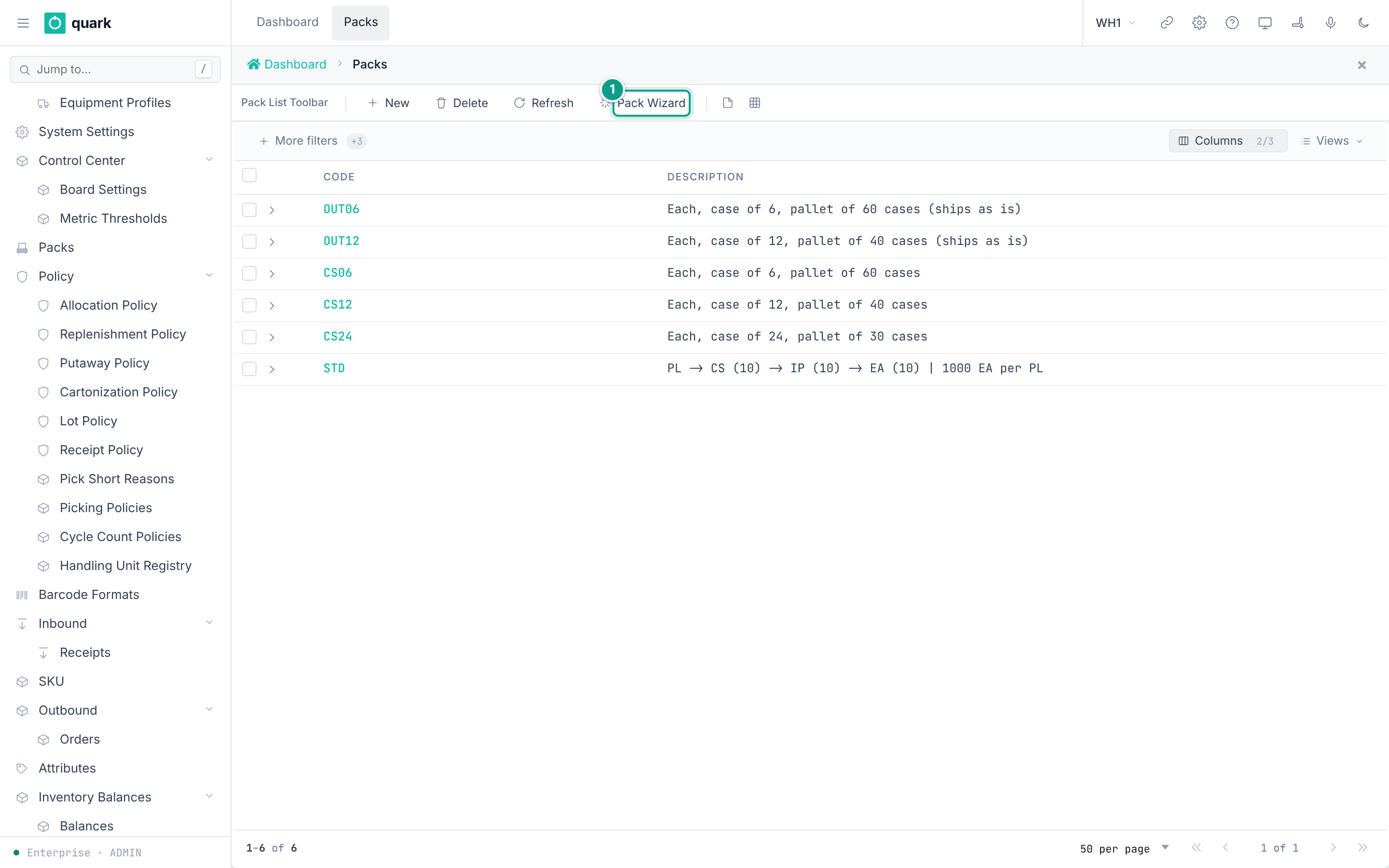
- Open
Sidebar > Packs. - Click
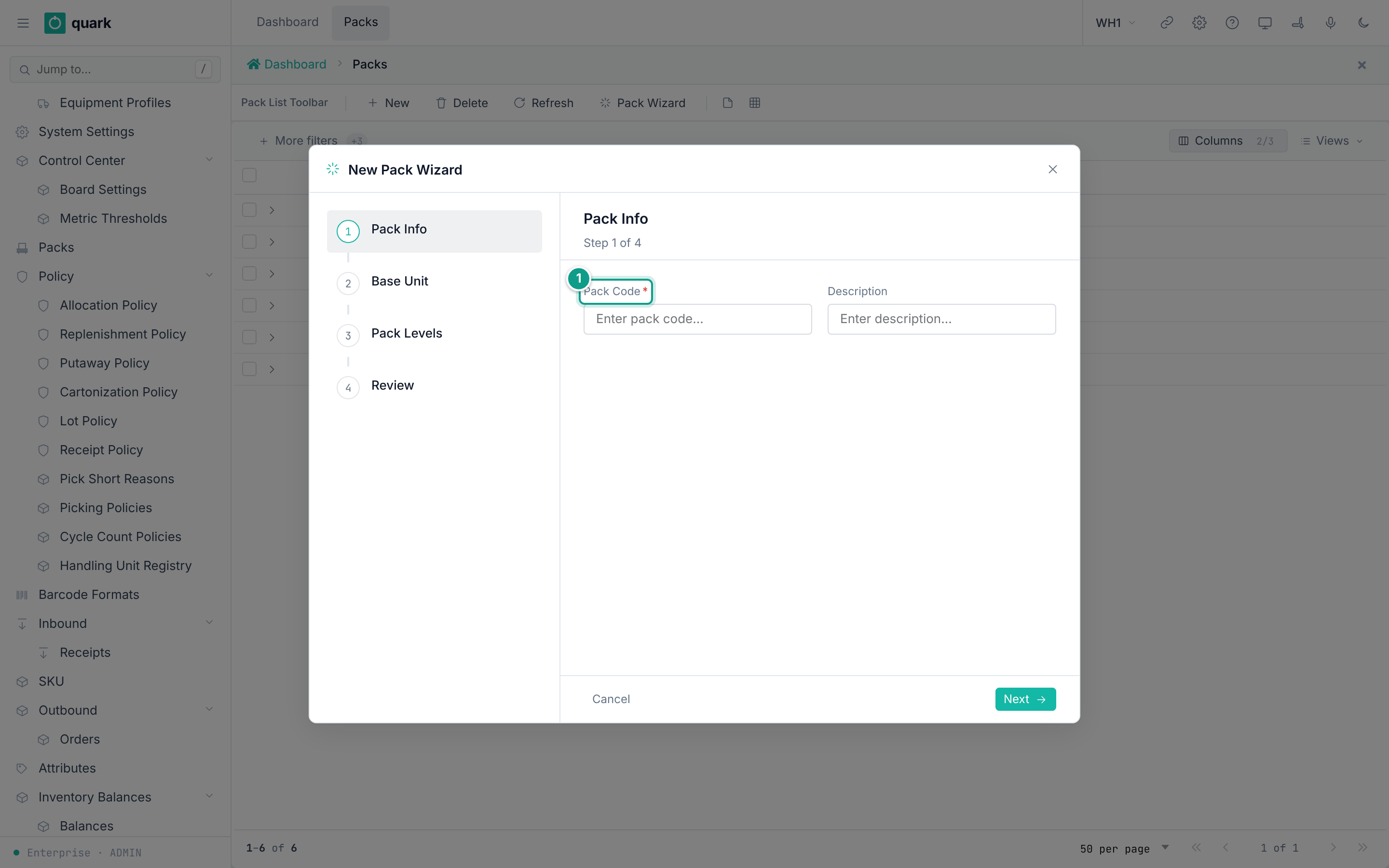
Pack Wizard. The wizardNew Pack Wizardopens. - Step
Pack Info: fillPack CodeandDescription. - Step
Base Unit: pickBase UOM. Fill weight, cube and size of the base unit. - Step
Pack Levels: fillQty per ChildandParent UOM. Repeat to add more levels. - Step
Review: read theSummary. Finish.
Steps (by hand)
- Open
Sidebar > Packs. ClickNew. FillCodeandDescription. Save. - Open the pack. Click
New Item. Fill the tabBasic. FillDimensions,Pallet,Catch Weightif needed. - Click
Save.
Field reference
Item tab Basic (pack_item_basic_form):
| Field | Meaning | Allowed values | Example |
|---|---|---|---|
UoM (required) | Unit of the item. | A UOM code. Not repeated in the pack. | CS |
Qty per Child | How many child units this unit holds. | Above 0 for any unit that has a child. | 10 |
Child UoM | The next smaller unit. | Another item of the same pack. Empty for the base unit. | IP |
Qty/BaseUnit | Base units in one of this unit. Server computes it. Read-only. | Number. | 1000 |
Hierarchy Level | 0 = largest unit. Server computes it. Read-only. | Whole number. | 0 |
Cartonize | May this unit be used in cartonization? | On or off. | on |
Replenish | For replenishment. | On or off. | off |
Other tabs: Dimensions (Length, Width, Height, Weight, Cube), Pallet (Ti (Per Layer), Hi (Layers), Wood Length, Wood Width, Wood Height), Catch Weight (Catch Weight, Catch Weight UoM, Nominal Weight, Min Weight, Max Weight, Dual UoM, Secondary UoM).
The tabs Converter and Breakdown on the pack card are helpers: UOM Converter and Qty Breakdown (button Calculate).
Rules checked by wms-pack (validate_hierarchy):
- The chain must have exactly one largest unit and exactly one base unit.
- A unit cannot contain itself.
- A unit can be the child of one parent only.
- No loops. All items must connect in one chain.
- A UOM cannot repeat.
Qty per Childmust be a finite number above zero.
What you should see
- The pack list shows
CodeandDescription. - The item list shows
Level,UOM,Weight,Cube,Qty/BaseUnit,Qty/Child.
If something goes wrong
| Message | Meaning | Fix |
|---|---|---|
UOM must not be empty | An item has no unit. | Pick a unit. |
UOM '{uom}' occurs more than once | The same unit appears twice. | Remove one. |
UOM '{uom}' references missing child UOM '{child_uom}' | The child unit is not in the pack. | Add the child item. |
UOM '{uom}' cannot contain itself | Child = same unit. | Pick another child. |
child UOM '{child_uom}' is claimed by more than one parent | Two units name the same child. | Fix the chain. |
qty_per_child for UOM '{uom}' must be finite and greater than zero | Bad quantity. | Enter a number above 0. |
pack hierarchy must have exactly one root, found {count} | More than one largest unit. | Connect all units in one chain. |
pack hierarchy must have exactly one leaf, found {count} | More than one base unit. | Same. |
circular reference detected at UOM '{uom}' | The chain loops. | Fix the children. |
pack hierarchy is disconnected: {visited} of {total} items are reachable | Some items are outside the chain. | Connect or delete them. |
pack code '{code}' already exists | Pack code is used. | Use another code. |
pack {pack_id} is referenced and cannot be deleted | SKUs use the pack. | Change the SKUs first. |
What this affects later
- Quantities in base units (
Qty/BaseUnit) drive receiving, allocation and cartonization. - Allocation rules
EqPackPalletandNePackPalletcompare to the pack's pallet quantity. - The seeded pack
STD:PL -> CS (10) -> IP (10) -> EA (10), so 1000EAperPL.
The database column is child_pack_item_id (each item points down to its child) and the screens use Qty per Child. The old design note docs-obsidian/domain/pack-hierarchy.md still describes parent_pack_item_id. That note is out of date.
6. Lot policy
What you will do
Say which lot dates and attributes are shown, required and checked.
Before you start
- Role:
ADMINorMANAGER(write). Others read. - Seeded policies:
STD("Standard Lot Policy") andNOLOT("No-tracking policy").
Steps
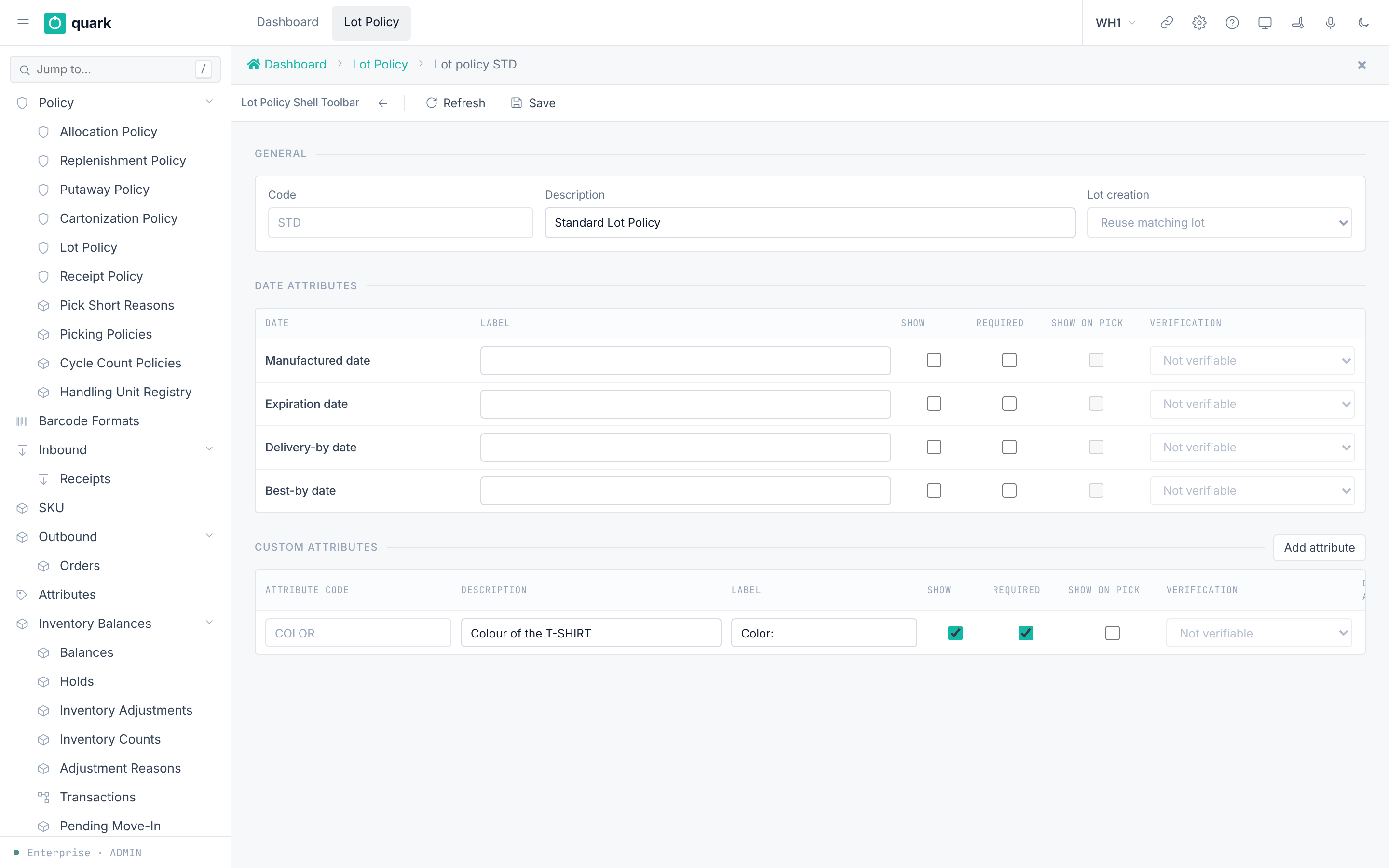
- Open
Sidebar > Policy > Lot Policy. - Click
New. FillCodeandDescription. - Section
Lot creation: pick the mode. - Section
Date attributes: for each of the four dates setShow,Required,Label,Show on pick,Verification. - Section
Custom attributes: clickAdd attribute. Fill the row. - Click
Save. - Assign the policy to SKUs on the SKU tab
Policies.
Field reference
| Field | Meaning | Allowed values | Example |
|---|---|---|---|
Code | Key. | Text. | PHARMA |
Description | Free text. | Text. | |
Lot creation | When a lot is created. | Reuse matching lot (Existing), One lot per receipt (PerReceipt), One lot per receive event (PerReceiveEvent). Seed Existing. | |
| Dates | Manufactured date, Expiration date, Delivery-by date, Best-by date. | Each has Show, Required, Label, Show on pick, Verification. | |
Verification | How the picker proves the value. | Not verifiable, Visual, Barcode, Visual or barcode. | Barcode |
Attribute code | Code of a custom lot attribute. | Up to 20 characters. Unique per policy. | COLOR |
Override allowed | May a supervisor override a mismatch? | On or off. | off |
Rules from the database:
RequiredneedsShow(lot_policy_attribute_required_is_shown).Show on pickneedsShow(chk_lot_policy_attribute_pick_needs_receipt).- Verification other than
Not verifiableneedsShow on pick(chk_lot_policy_attribute_verified_is_shown). - One attribute code once per policy.
Also the receipt line has Lot Attr Check with Disabled, Advisory, Strict.
What you should see
- The message
Lot policy saved.
If something goes wrong
| Message | Meaning | Fix |
|---|---|---|
| Check errors above | The flags do not follow the rules. | Turn on Show first. |
Someone changed this record after you opened it. Look at the current version and make your change again. | Version conflict. | Refresh and repeat. |
| Delete refused | A SKU or a lot uses the policy. | Change the SKU first. |
What this affects later
- Receiving asks for the shown and required dates and attributes.
- Picking shows the attributes that have
Show on pickand checks them as set.
7. Serial number tracking
What you will do
Turn on serial tracking for a SKU and describe the serial format.
Before you start
- Role:
ADMINorMANAGER(write). - The SKU exists.
Steps
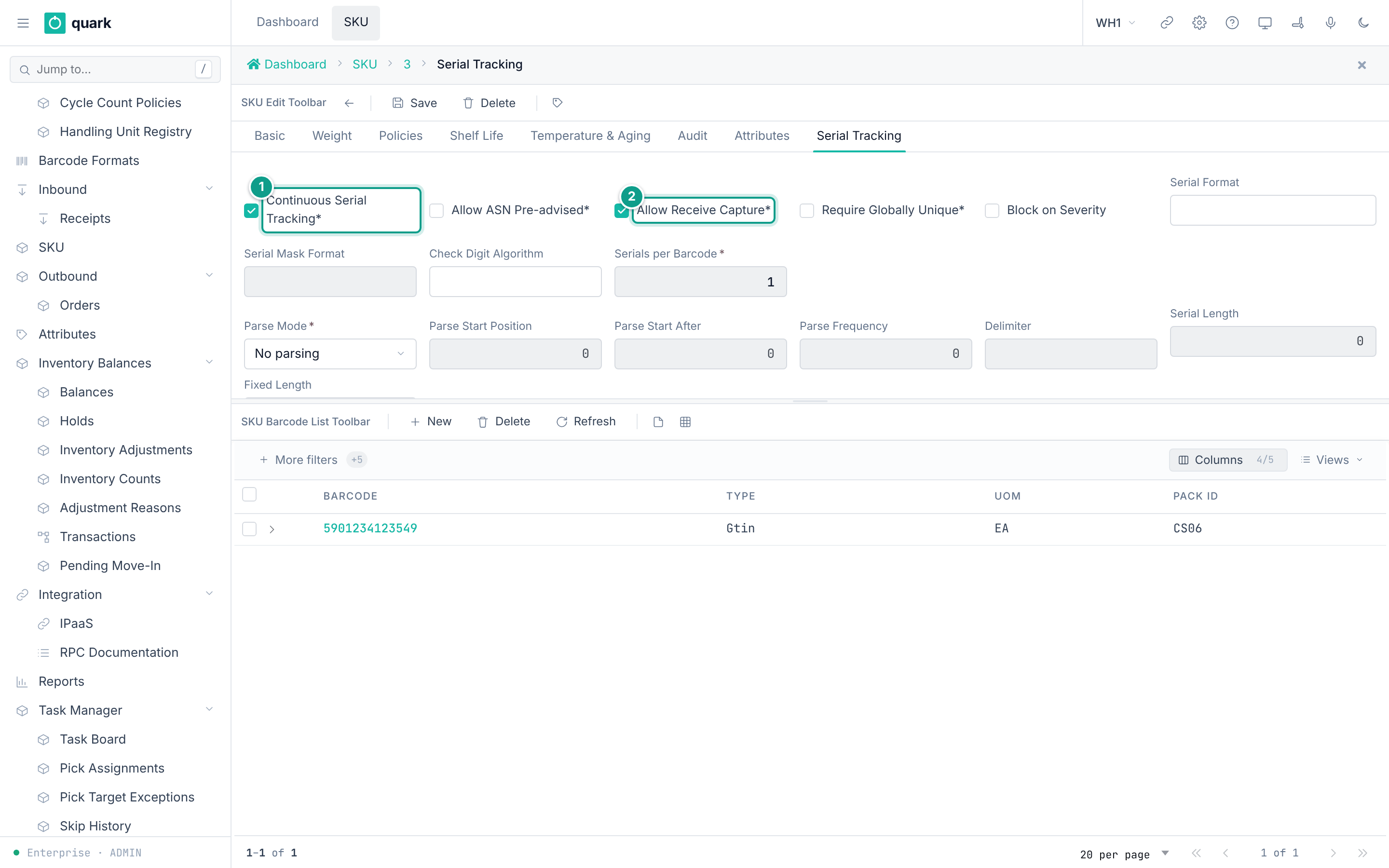
- Open
Sidebar > SKU. Open the SKU. - Open the tab
Serial Tracking. - Turn on
Continuous Serial Tracking. Without it, the SKU is not serial-tracked. - Set
Allow ASN Pre-advisedandAllow Receive Capture. - Set
Serial Scope,Parse Modeand the parse fields. - Click
Save.
Field reference
| Field | Meaning | Allowed values | Example |
|---|---|---|---|
Continuous Serial Tracking (required) | Turns tracking on. Default off. | On or off. | on |
Serial Scope (required) | What one serial identifies. | PerUnit, PerCase, PerInnerPack, PerPallet. Default PerUnit. | PerUnit |
Parse Mode (required) | How a barcode yields serials. | None, Fixed, Bounded. Default None. | None |
Serials per Barcode (required) | Serials in one barcode. | Whole number. Default 1. | 1 |
Serial Length, Fixed Length, Delimiter | Barcode layout. | Number or text. | |
Parse Start Position, Parse Start After, Parse Frequency | Where serials start. | Whole numbers. | |
Serial Format, Serial Mask Format, Check Digit Algorithm | Format rules. | Text up to 20 or 200 characters. | |
Auto-Increment (required) | Create serials by counting. Default off. | On or off. | off |
Increment Source Pos., Increment Length | Counting layout. | Whole numbers. | |
Allow ASN Pre-advised (required) | Serials may come on the ASN. | On or off. Default off. | on |
Allow Receive Capture (required) | Serials may be scanned at receipt. | On or off. Default off. | on |
Allow deferred capture | Capture later. | On or off. | off |
Require Globally Unique (required) | Serial unique over the whole warehouse. | On or off. Default off. | on |
Max Serials per LPN | Anomaly limit. | Whole number. Default 1000. | 1000 |
Velocity Threshold (min) | Anomaly limit. | Whole number. Default 30. | 30 |
Vendor Surge Factor | Anomaly limit. | Number. Default 3.0. | 3.0 |
Block on Severity | Block on a severe anomaly. | On or off. | off |
Warranty Period (days) | Warranty. | Whole number. | 365 |
Industry Profile | Hint for the profile. | general, pharma, electronics, food, aerospace. | general |
Pick Episode Reassignment (required) | What happens when a picker changes during a serial scan. | Block, Handover, CancelAndRestart. Default Block. | Block |
Packing a serial-tracked SKU is refused today (SERIAL_PACKING_NOT_SUPPORTED, wms-outbound/src/packing/README.md).
What you should see
- Receiving asks for serials. Inventory shows
By Serialrows.
If something goes wrong
| Message | Meaning | Fix |
|---|---|---|
Code 65 SerialRequired | A serial is needed on the line. | Scan the serial. |
Code 66 SerialFormatInvalid | The serial does not match the format. | Scan again or fix the format. |
Code 67 SerialDuplicate | The serial exists already. | Check the serial. |
Code 95 SerialAsnNotAdvised | The SKU needs the serial on the ASN first. | Advise serials on the receipt line (tab Pre-Advised Serials). |
Check chk_sku_serial_pick_episode_reassignment_mode | A value outside the list. | Use the listed values. |
What this affects later
-
The RF terminals ask for serials at receive, move, pick.
-
SERIAL_PACKING_NOT_SUPPORTEDblocks closing a pack carton for a serial SKU. -
Industry Profileenforces nothing. It is a stored hint only. No rule in the code reads it.
8. Custom attributes
What you will do
Add your own fields to SKUs, receipts or locations.
Steps
- Open
Sidebar > Attributes. - Click
New. - Fill
Entity Type,Code,Label,Data Type. ClickSave. - The attribute appears in the tab
Attributesof the SKU (or the location).
Field reference
| Field | Meaning | Allowed values | Example |
|---|---|---|---|
Entity Type (required) | Where the attribute appears. | sku, receipt, location (code list ENTITY_TYPE). | sku |
Code (required) | Key. Unique per entity type and owner. | Text. | COLOR |
Label (required) | Shown name. | Text. | Color |
Data Type (required) | Type of value. | Text, Integer, Decimal, Boolean, Date. | Text |
Owner | Limit to one owner. Blank = all. | An owner. | |
Display Order | Order. | Whole number. | 10 |
Required | Must have a value. | On or off. | off |
Active | In use. | On or off. | on |
Default Value | Start value. | Text. |
What you should see
- The row in the list
Attribute Definitions.
If something goes wrong
| Message | Meaning | Fix |
|---|---|---|
Duplicate key uq_attr_def_owner or uq_attr_def_system | The code is used for that entity type and owner. | Use another code. |
What this affects later
- Values are stored per record. Location attributes also feed putaway conditions (
Location attribute,SKU attribute).
9. Handling unit types (containers you own)
Handling unit types describe reusable containers such as crates.
The enterprise menu Handling Unit Types creates the types. Policy > Handling Unit Registry registers instances.
| Field (type) | Meaning | Allowed values |
|---|---|---|
Code, Name (required) | Identity. | Text. |
Holds Inventory, Holds Containers | What it can hold. | On or off. |
Positions | Slots. | Whole number. |
Shippable, Returnable, Inspect on Return | Flow flags. | On or off. |
Default Usage Policy | Who may use units. Empty = by the asset owner (warehouse: shared; client: own only). | Code list. |
Inner Length, Inner Width, Inner Height, Max Gross Weight, Tare Weight | Physical size. | Numbers. |
Code Prefix | Prefix of unit codes. | Text. |
Registering (Register Handling Units): Count (required), Location (required), Owned By (required), Client (only for client-owned units), Print Labels. Buttons Cancel, Register.
The label handling_unit_label prints once for each registered unit (see 07-printing-and-labels.md).
No type is seeded.
Allowed values:
Default Usage Policy:OwnOnlyorWarehouseShared.Owned By:This warehouse(ThisWarehouse) orClient(Owner). WithClientyou must also pick theClient. WithThis warehousethe client must stay empty.