Integrations and API
This chapter lists only what exists today. It is short on purpose.
1. What exists
| Part | What it does | Where |
|---|---|---|
| JSON-RPC API | Every business action as a method call. | Path /rpc on app-server. |
| API keys | Let another system call the API as a user. | 02-users-roles-permissions.md, section 7. |
| RPC documentation | Browsable list of methods. | Sidebar > Integration > RPC Documentation. |
| Business events | Events such as process.receipt.closed. | Enterprise > Integration. |
| Subscribers | Who receives events (webhook, poll, internal). | Enterprise > Integration > Subscribers. |
| IPaaS | A flow tool that turns events into calls to ERPs and marketplaces. | Sidebar > Integration > IPaaS. |
Not covered here: connectors to a specific ERP or marketplace. Those are flows built in IPaaS.
When IPaaS starts it seeds 16 system connector templates and 29 system flow templates (templates/connectors.rs, templates/flows.rs; the seed is idempotent). The connectors are:
| Kind | Connectors |
|---|---|
| ERP | one_c_http (1C, HTTP), sap_rfc (SAP, through an RFC proxy) |
| Marketplaces | wildberries_supplies, wildberries_content, ozon_seller, kaspi_merchant, kaspi_ftp, olx_kz, yandex_market, megamarket, avito |
| Product marking | chestnyznak_gis_mt, chestnyznak_mdlp, is_mpt_kz (the last two go through a GOST proxy) |
| Generic | wms_app_server (calls this WMS), generic_http |
A connector is a template only. You still have to enter the address and the credentials of your own system.
2. Call the API
What you will do
Make a call from another system.
Before you start
- A user with a limited role and
API accesson. - An API key (see
02-users-roles-permissions.md, section 7).
Steps
- Open
Sidebar > Integration > RPC Documentationto find the method and its parameters. - Send an HTTP POST to the
/rpcpath with the headerAuthorization: Bearer <key>. - Send a JSON-RPC 2.0 body.
- For a command (any write), send a unique
idempotency_keyinparams.meta. - For a command on an entity that a user read first, send
versioninparams.data.
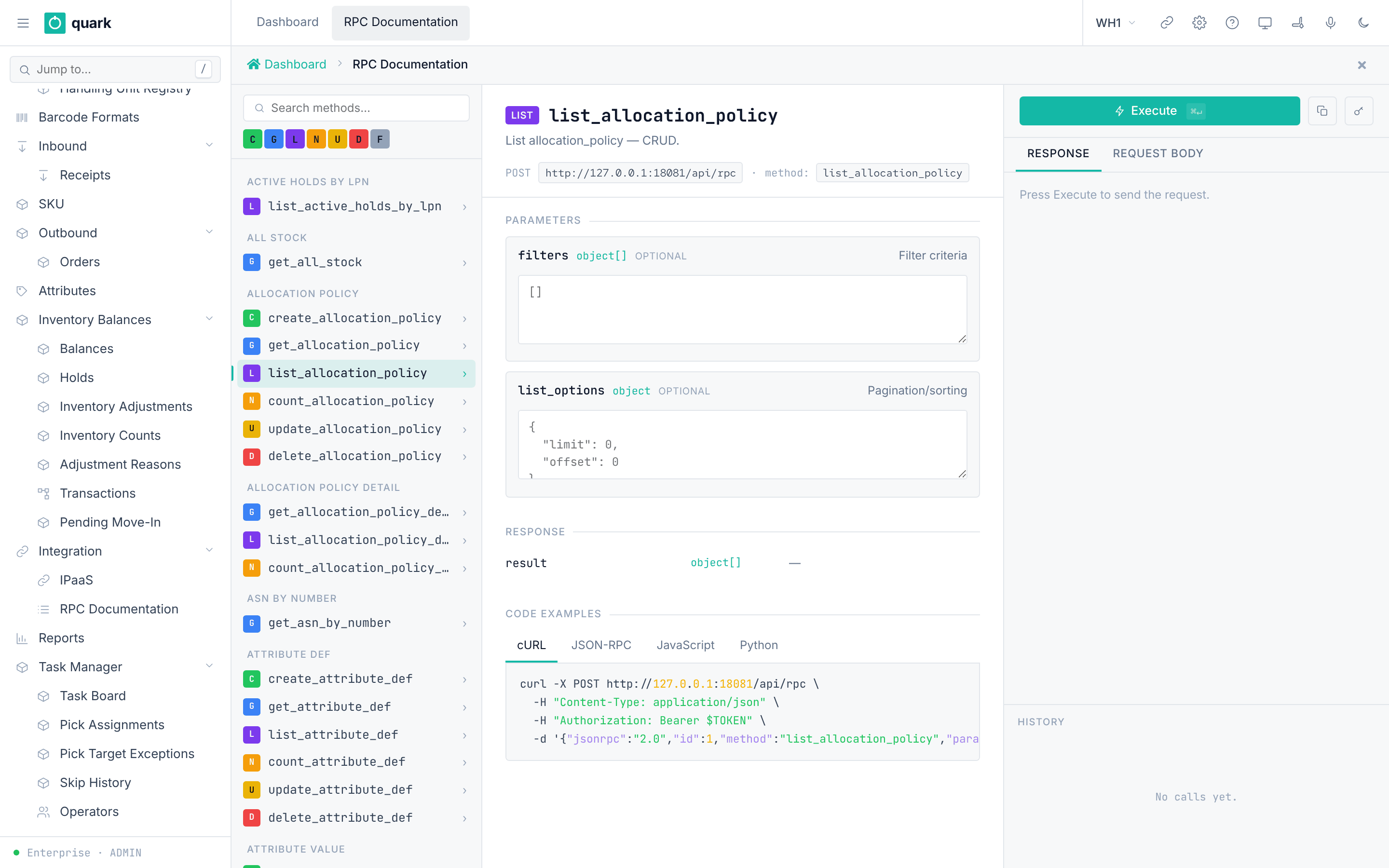
Field reference
The shape of a call (from .claude/rules/api-versioning-and-idempotency.md):
{
  "jsonrpc": "2.0",
  "id": "req-1",
  "method": "receipt_close",
  "params": {
    "meta": { "idempotency_key": "<UUID v4>" },
    "data": { "version": 7 }
  }
}
| Kind | idempotency_key | version in data | Example |
|---|---|---|---|
query | no | no | list_sku, get_shipment_order |
stateless_command | required | no | receipt_receive_against_asn, move_execute, shipment_order_allocate |
stateful_command | required | required | receipt_close, receipt_cancel, update_allocation_policy |
Method groups (modules of the RPC catalogue):
| Group | Modules |
|---|---|
| Master data | code, code_value, pack, owner, owner_address, owner_bank_account, owner_config, putawayzone, location, loc_lot_commingle, putawayzone_lot_commingle, sku, sku_audit, sku_barcode, barcode_format, barcode_format_detail, check_digit, key |
| Inbound | lot_policy, receipt_policy, receipt, receipt_commands, receipt_audit, receipt_detail, receipt_expected_lot_attributes, receipt_detail_damage, receipt_damage_photo, case_level, case_level_commands |
| Inventory | putaway_policy, inventory_hold_code, move_command, putaway, hold, serial_commands, transaction_log, sku_serial_config, inventory_balance_serial, handling_unit, inventory_adjustment, inventory_count, lot_by_attributes, barcode_scan |
| Outbound | allocation_policy, replenishment_policy, cartonization_policy, wave, shipment_order, shipment_order_commands, container_commands, pick_commands, pick_assignment, pick_short_reason, picking_policy, packing |
| Tasks | work_area, equipment_profile, operator, task, task_commands, wms_task |
| Reporting | report_definition, report_template, label_definition, label_template, printer_configuration, printer_assignments |
| Enterprise | project, user, sys_settings, warehouse, role, override_grant, user_warehouse, user_api_key, audit_log, role_permission, permission_matrix, dashboard, dashboard_setting, log_level, handling_unit_type |
| Integration | inventory, inventory_search, marking, entity_attribute, event_registry, integration_event, integration_event_delivery |
| RF | screen_def, metadata |
Rights: each method has a role list. The defaults are in the role table in 02-users-roles-permissions.md. Edit them in the Permission Matrix.
What you should see
- A JSON-RPC result, or an error object with a code.
- For a stateful command that hits a version conflict, the error code is
40and the data holds the current state (current_state) so the client can refresh.
If something goes wrong
| Message | Meaning | Fix |
|---|---|---|
| HTTP 401 | Key unknown, revoked or expired. | Generate a new key. |
Forbidden(...) | The key owner's role lacks the method. | Grant the method in the Permission Matrix. |
| Idempotency conflict (code 42) | The same key was used with a different payload. | Use a new key. |
| Idempotency in progress (code 44) | The same request is still running. | Retry with the same key. |
| Version conflict (code 40) | The entity changed. | Read it again, then repeat. |
What this affects later
- The same domain rules apply as in the web UI.
3. Business events and subscribers
What you will do
Choose which events leave the warehouse system and where they go.
Before you start
- Role:
ADMIN(Enterprise mode). - A receiver that can accept a webhook, or an IPaaS flow.
Steps
- Open
Enterprise > Integration > Event Registry. Check the events. 339 are seeded:bio_lifecycle267,business61,form_render3,scheduled3,field_change4,security1. - Open
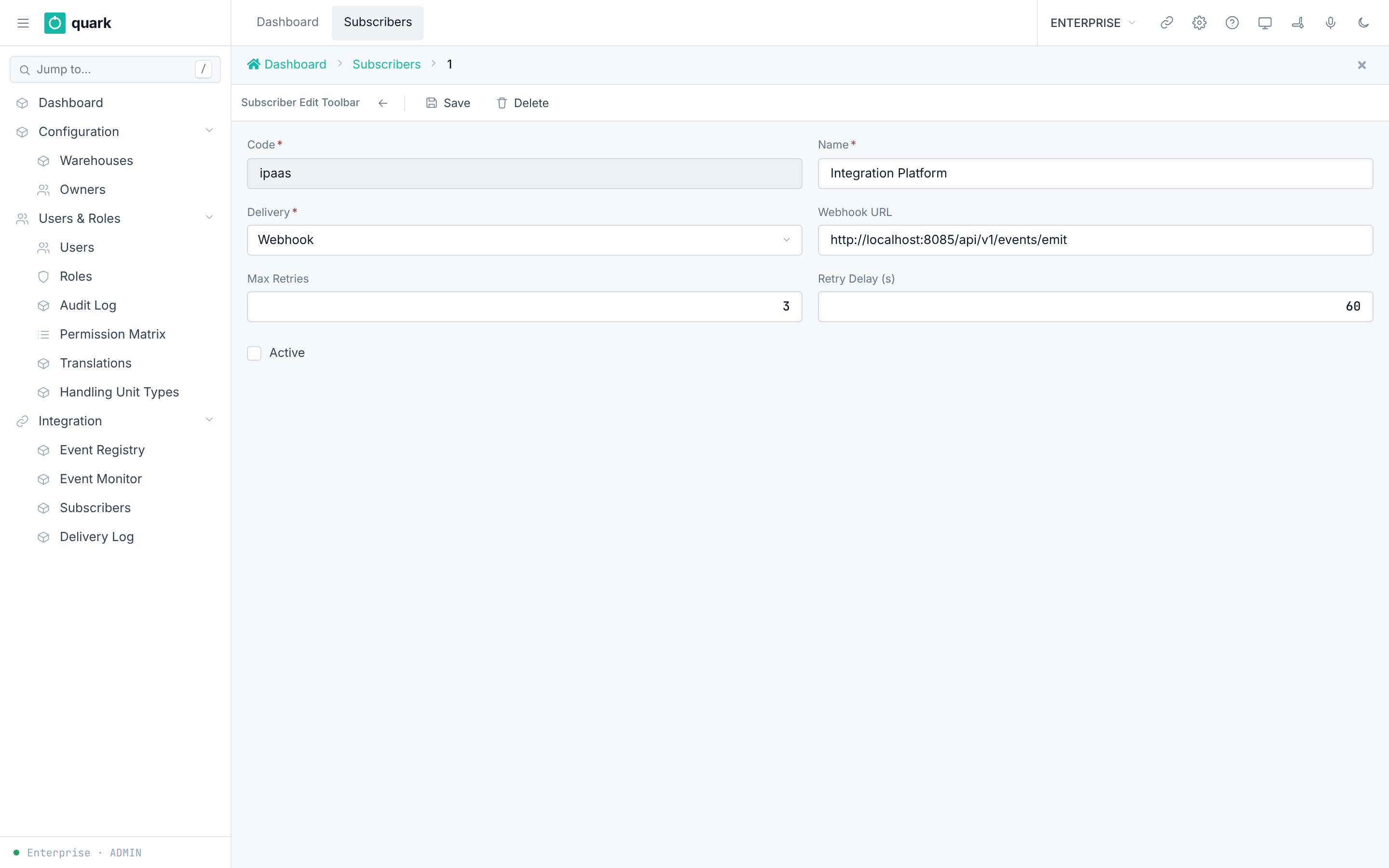
Enterprise > Integration > Subscribers. ClickNew. - Fill
Name,Code,Delivery,Webhook URL,Max Retries,Retry Delay (s). Turn onActive. - Click
Save. - Watch
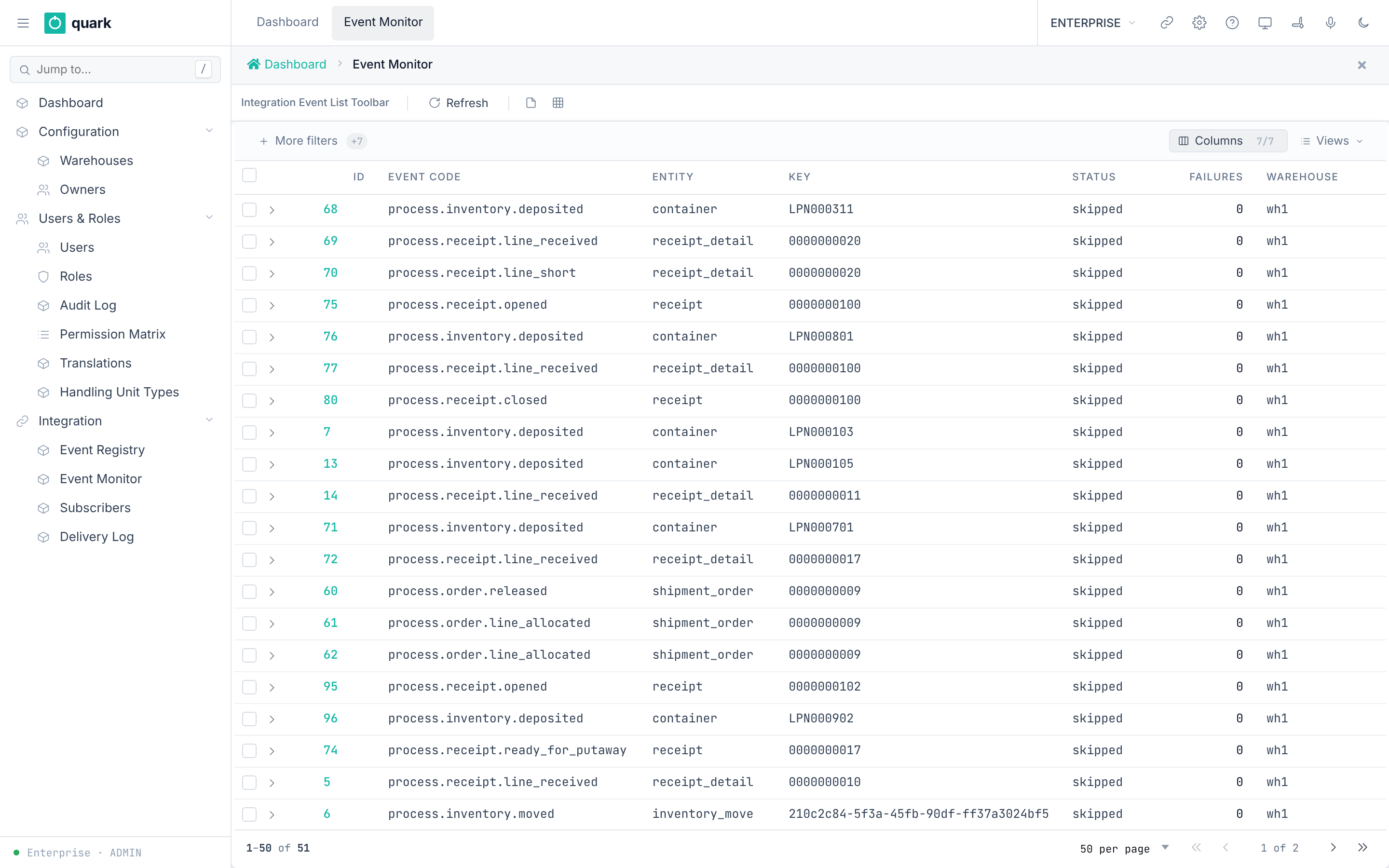
Enterprise > Integration > Event MonitorandDelivery Log.
Field reference
Subscriber (ent_integration_subscriber_normal_form):
| Field | Meaning | Allowed values | Example |
|---|---|---|---|
Name (required) | Display name. | Text up to 200 characters. | ERP link |
Code (required) | Key. | Text up to 50 characters. | erp |
Delivery (required) | How the event gets out. | poll, webhook, queue (list DELIVERY_METHOD). The seed also uses internal. | webhook |
Webhook URL | Target for webhook. | URL up to 500 characters. | https://erp.example/hook |
Max Retries | Delivery attempts. | Whole number. Default 3. | 3 |
Retry Delay (s) | Seconds between attempts. | Whole number. Default 60. | 60 |
Active | In use. | On or off. | on |
The event filter (event_filter, JSON) picks event codes. It accepts wildcards such as process.*. It has no field on this form.
Event registry (ent_event_registry_normal_form): Code (required), Name (required), Description, Active, Builtin (read-only), Category (required).
Seeded subscribers:
| Code | Delivery | Active | Purpose |
|---|---|---|---|
ipaas | webhook to http://localhost:8085/api/v1/events/emit | off | Sends process.* events to IPaaS. Turn on after IPaaS is reachable. |
quark_outbound_execution | internal | on | Allocation top-up after contention or a short pick. Do not turn off. |
quark_inventory_count | internal | on | Counts a location when a warehouse event asks for it. Do not turn off. |
Business event codes include, for example: process.order.created, process.order.released, process.order.closed, process.receipt.opened, process.receipt.line_received, process.receipt.closed, process.receipt.damaged_reported, process.putaway.completed, process.pick.created.
What you should see
- A new event appears in
Event Monitorwith status and failure count. - A delivery row appears in
Delivery Logwith status, attempts, last error, HTTP code.
If something goes wrong
| Message | Meaning | Fix |
|---|---|---|
Delivery stays failed with Last Error | The receiver refuses or is down. | Fix the receiver. The system retries up to Max Retries. |
| No delivery rows | The subscriber is off or its filter matches nothing. | Turn on Active; check the filter. |
What this affects later
- The two internal subscribers drive allocation top-up and event-driven counts. If they are off, those functions stop.
There is no web field and no API field for event_filter or warehouse_filter. The subscriber model does not carry them. They are set only in the database. A new subscriber gets the default {"event_codes": ["*"]} (all events). The delivery worker does read both filters (integration_delivery.rs): event_codes accepts *, a prefix such as process.*, or an exact code, and warehouse_filter is {"warehouses": [...]}. An empty warehouse list allows all warehouses.
4. IPaaS
Sidebar > Integration > IPaaS opens the Integration Platform in a frame (integration_platform, an HTML page).
Use it to build flows that react to events. Its own guide is outside this chapter.
IPaaS has its own login model. The WMS session is not passed to it.
- The sidebar item
IPaaSopens a frame that loads/integration-uifrom the web UI and talks to the IPaaS service athttp://localhost:8085(this address is fixed in the page code). - The IPaaS service checks the header
X-Api-Keyon every call. If its settingIP_API_KEYis empty (dev mode), it lets everyone in as tenant 1000 with scopeadmin. IfIP_API_KEYis set, the key must equal it or match a row inplatform_api_keys(stored as a SHA-256 hash). - The embedded UI sends no
X-Api-Key, and the service does not allow that header in CORS. So withIP_API_KEYset, the frame cannot log in. Use dev mode, or call the IPaaS API directly with a key.
Not confirmed by code: which WMS roles see the sidebar item
IPaaS. The item is gated like other menu items by the role permission grants, and no seed file names the roles. To verify: openSidebar > Configuration > Users & Roles > Permission Matrixand look for the menu itemintegration_platformfor each role. Or log in as each role and look at the sidebar.
5. Outbound and replenishment calls
- Shipping is available through
shipment_order_shipfor one complete order andconfirm_shipmentfor a complete reviewed Load. Both perform Goods Issue; loading alone does not deduct stock. - Loading uses the
load_*methods, including separate read-only scan review and state-changing confirmation calls. - Replenishment uses
replenishment_plan,replenishment_take_next,replenishment_confirmandreplenishment_cancel. The policy urgency card saves throughreplenishment_policy_save.
Use the generated API reference for current request and response schemas. Do not treat a successful loading confirmation as proof of shipment; verify the Goods Issue receipt or shipment history.