Receipt lines list
The lines list is the bottom part of the receipt screen.
It shows the lines of the open receipt. The form is receipt_detail_list ("Receipt Lines"). The data table is receipt_detail.
The list is read from the API method list_receipt_detail_lines. Rows are filtered by the open receipt.
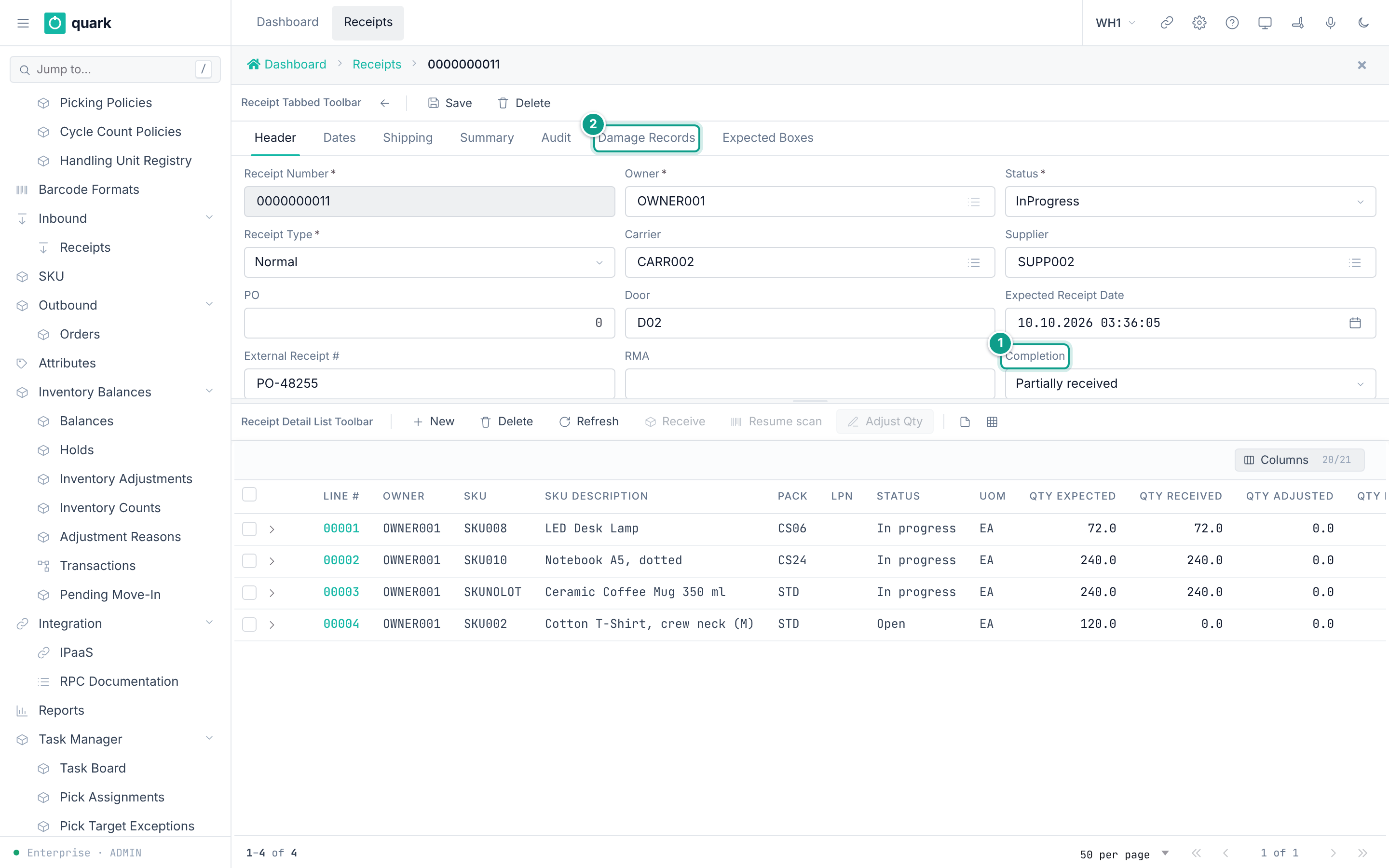
Columns
All columns are read only. 20 of 21 columns are shown at first. You can show or hide columns with Columns.
| Label | Column | Type | Notes |
|---|---|---|---|
ID | id | Whole number | Hidden. |
Line # | receipt_line_number | Text | Five characters, for example 00001. |
Owner | owner_id | Whole number | Shows the owner code. |
SKU | sku | Text | The SKU code. |
SKU Description | sku_descr | Text | Looked up from the SKU master. |
Pack | pack_id | Whole number | Shows the pack code. |
LPN | lpn | Text | The expected LPN (pallet) announced by the supplier. Empty when none. |
Status | status | Text | The status of the line: Open, In progress, On hold, Closed, Cancelled. |
UOM | uom | Text | The unit of the expected quantity. |
Qty Expected | qty_expected | Number | The planned quantity. |
Qty Received | qty_received | Number | The received quantity. |
Qty Adjusted | qty_adjusted | Number | Always 0. See Line detail tab. |
Qty Rejected | qty_rejected | Number | |
To Loc | to_loc | Text | The location of the last receive. |
To Lot | to_lot | Text | The lot of the last receive. |
To LPN | to_lpn | Text | The LPN the goods were received onto. |
Completion | completion | Text | Pending, Partial, Full, Over. |
Disposition | target_disposition | Text | Stock, CrossDock, Hold. |
Qty Damaged | qty_damaged | Number | |
Case ID | case_id | Text | Always empty. The database column was removed, so the column has no data. |
Serials | serial_numbers | Text | Always empty. The database column was removed. Use the line card tab Serials. |
The list also carries two values that are not columns: serial_capture_open (is there an unfinished serial scan on the line) and version (the change counter of the line).
Resume scan and Adjust Qty read them from the selected row.
Toolbar buttons
The toolbar is receipt_detail_list_toolbar.
| Button | Needs | What it does | Task page |
|---|---|---|---|
New | The receipt is saved and is Open or InProgress | Opens a new empty line card. | Adding a line |
Delete | The receipt is saved and is Open or InProgress. One or more ticked lines. | Deletes the ticked lines. | Editing and deleting lines |
Refresh | The receipt is saved | Reads the lines again. | |
Receive | One ticked line with status Open or InProgress, on a receipt with status Open or InProgress | Opens the window Receive line. | Receiving a line |
Resume scan | One ticked line with an unfinished serial scan, on a receipt with status Open or InProgress | Opens the serial scan page. | Capturing serial numbers |
Adjust Qty | One ticked line with status Open, InProgress or Closed, on a receipt with status Open or InProgress | Opens the window Adjust Received Qty. | Adjusting received quantity |
The grey texts are:
| Button | Text when grey |
|---|---|
New, Delete, Refresh before the first save | Save receipt first |
New, Delete | The receipt is closed, cancelled or on hold - lines can no longer be added or removed |
Resume scan | No unfinished serial scan on this line, or the receipt is not open |
Receive | Receiving needs one open line on an open receipt |
Adjust Qty | Adjusting needs one line of an open receipt |
Source: the bindings of the form receipt_detail_list in 001_baseline.sql and 084_web_receipt_adjust_and_box_exceptions.sql (wms-meta-ui migrations).
A button is grey when the condition cannot be read, for example when two lines are ticked.
Row actions
| Action | Result |
|---|---|
| Click a line | Opens the line card in the bottom slot (interaction Interaction_ReceiptDetailRowClick). |
| Tick the check box | Selects the line for the toolbar buttons. |
Messages
| When | Message |
|---|---|
| Delete is refused because of the status of the receipt | receipt {id} is {status} - cannot delete receipt line in its current lifecycle state |
Resume scan and there is no unfinished scan | No unfinished serial scan on this line |
Resume scan and the scan has no location | The unfinished serial scan on this line has no location - it cannot be resumed |
Resume scan and no single line is selected | Select exactly one receipt line |
Source: crates/libs/wms-inbound/src/service/receipt/planning/contracts.rs:59-63 and crates/services/web-ui-server/src/extensions/customization/receipt/serial_scan_action.rs:73-75,268.
Related pages
- Line detail tab
- Receiving a line
- Adding a line
- Receipt statuses and transitions
- API:
list_receipt_detail_lines,create_receipt_detail,delete_many_receipt_detail - RF terminal:
Receive Against ASN, screensRCASN01SKUandRCASN01LINE.